视图 (View)
视图控件 (View) 是一种切换更为便利的容器控件,通过事件响应(点击以及四个方向的滑动等)可以实时创建任一视图控件并可选择多种切换效果。切换过程中内存中会存在两个 view ,切换完成后会自动清理未显示的 view ,可以有效降低内存消耗。

View 流程图
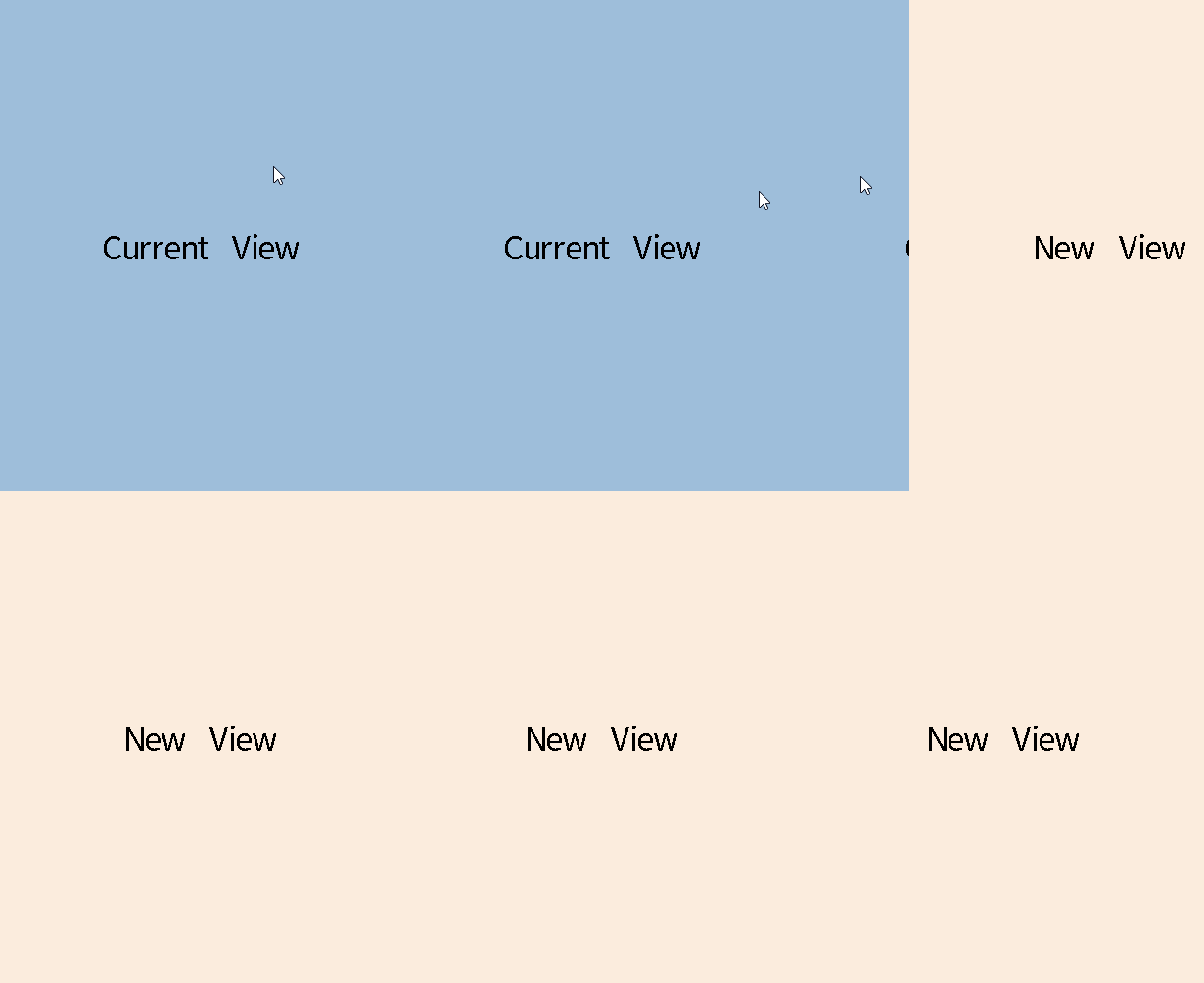
View 切换示意图
用法
注册视图控件描述子
使用 gui_view_descriptor_register() 函数传入视图控件描述子地址将其注册在描述子列表中供其他视图控件读取使用,作为创建视图控件的参数,其中 gui_view_descriptor 结构体定义如下:
typedef struct gui_view_descriptor
{
    const char *name;
    gui_view_t **pView;

    void (* on_switch_in)(gui_view_t *view);  // Callback function when view is switched in and created.
    void (* on_switch_out)(gui_view_t
                           *view); // Callback function when view is switched out and destroyed.

uint8_t keep       :
    1; // If keep is true, the view will not be destroyed when switch to other view and will be created when register view
} gui_view_descriptor_t;
获得视图控件描述子
使用 gui_view_descriptor_get() 函数通过传入字符串获取对应 name 的视图控件描述子。
创建视图控件
使用 gui_view_create() 函数可以根据描述子创建一个视图控件。
设置视图切换事件
使用 gui_view_switch_on_event() 设置视图切换事件,对某一个事件可以重复设置,会使用最新的描述子。具体的事件类型包括 GUI_EVENT_TOUCH_CLICKED 、 GUI_EVENT_KB_SHORT_PRESSED 、 GUI_EVENT_TOUCH_MOVE_LEFT、 GUI_EVENT_TOUCH_MOVE_RIGHT 等。具体的切换风格请参考下列枚举:
typedef enum
{
    SWITCH_INIT_STATE = 0x0000, ///< Default status.
    SWITCH_IN_STILL_USE_BLUR,   ///< Switch in still with gauss blur.
    SWITCH_OUT_STILL_USE_BLUR,  ///< Switch out still with gauss blur.

    SWITCH_OUT_TO_LEFT_USE_TRANSLATION = 0x0100, ///< Switch out to left with transition effect.
    SWITCH_OUT_TO_RIGHT_USE_TRANSLATION, ///< Switch out to right with transition effect.
    SWITCH_OUT_TO_TOP_USE_TRANSLATION, ///< Switch out to top with transition effect.
    SWITCH_OUT_TO_BOTTOM_USE_TRANSLATION, ///< Switch out to bottom with transition effect.

    SWITCH_IN_FROM_LEFT_USE_TRANSLATION, ///< Switch in from left with transition effect.
    SWITCH_IN_FROM_RIGHT_USE_TRANSLATION, ///< Switch in from right with transition effect.
    SWITCH_IN_FROM_TOP_USE_TRANSLATION, ///< Switch in from top with transition effect.
    SWITCH_IN_FROM_BOTTOM_USE_TRANSLATION, ///< Switch in from bottom with transition effect.

    SWITCH_IN_FROM_LEFT_USE_CUBE = 0x0200, ///< Switch in from left with cube effect.
    SWITCH_IN_FROM_RIGHT_USE_CUBE, ///< Switch in from right with cube effect.
    SWITCH_IN_FROM_TOP_USE_CUBE, ///< Switch in from top with cube effect.
    SWITCH_IN_FROM_BOTTOM_USE_CUBE, ///< Switch in from bottom with cube effect.

    SWITCH_OUT_TO_LEFT_USE_CUBE, ///< Switch out to left with cube effect.
    SWITCH_OUT_TO_RIGHT_USE_CUBE, ///< Switch out to right with cube effect.
    SWITCH_OUT_TO_TOP_USE_CUBE, ///< Switch out to top with cube effect.
    SWITCH_OUT_TO_BOTTOM_USE_CUBE, ///< Switch out to bottom with cube effect.

    SWITCH_IN_FROM_LEFT_USE_ROTATE = 0x0300, ///< Switch in from left with rotate effect.
    SWITCH_IN_FROM_RIGHT_USE_ROTATE, ///< Switch in from right with rotate effect.
    SWITCH_IN_FROM_TOP_USE_ROTATE, ///< Switch in from top with rotate effect.
    SWITCH_IN_FROM_BOTTOM_USE_ROTATE, ///< Switch in from bottom with rotate effect.

    SWITCH_OUT_TO_LEFT_USE_ROTATE, ///< Switch out to left with rotate effect.
    SWITCH_OUT_TO_RIGHT_USE_ROTATE, ///< Switch out to right with rotate effect.
    SWITCH_OUT_TO_TOP_USE_ROTATE, ///< Switch out to top with rotate effect.
    SWITCH_OUT_TO_BOTTOM_USE_ROTATE, ///< Switch out to bottom with rotate effect.

    SWITCH_IN_FROM_LEFT_USE_REDUCTION = 0x0400, ///< Switch in from left with reduction effect.
    SWITCH_IN_FROM_RIGHT_USE_REDUCTION, ///< Switch in from right with reduction effect.
    SWITCH_IN_FROM_TOP_USE_REDUCTION, ///< Switch in from top with reduction effect.
    SWITCH_IN_FROM_BOTTOM_USE_REDUCTION, ///< Switch in from bottom with reduction effect.

    SWITCH_OUT_TO_LEFT_USE_REDUCTION, ///< Switch out to left with reduction effect.
    SWITCH_OUT_TO_RIGHT_USE_REDUCTION, ///< Switch out to right with reduction effect.
    SWITCH_OUT_TO_TOP_USE_REDUCTION, ///< Switch out to top with reduction effect.
    SWITCH_OUT_TO_BOTTOM_USE_REDUCTION, ///< Switch out to bottom with reduction effect.

    SWITCH_OUT_NONE_ANIMATION = 0x0500, ///< No animation.
    SWITCH_OUT_ANIMATION_ZOOM,
    SWITCH_OUT_ANIMATION_FADE,
    SWITCH_OUT_ANIMATION_MOVE_TO_RIGHT,
    SWITCH_OUT_ANIMATION_MOVE_TO_LEFT,
    SWITCH_OUT_ANIMATION_ZOOM_TO_TOP_LEFT,       // scale to top left
    SWITCH_OUT_ANIMATION_ZOOM_TO_TOP_RIGHT,      // scale to top right
    SWITCH_IN_ANIMATION_ZOOM_FROM_TOP_LEFT,      // scale from top left
    SWITCH_IN_ANIMATION_ZOOM_FROM_TOP_RIGHT,     // scale from top right
    SWITCH_IN_NONE_ANIMATION,           ///< No animation.
    SWITCH_IN_ANIMATION_ZOOM,
    SWITCH_IN_ANIMATION_FADE,
    SWITCH_IN_ANIMATION_MOVE_FADE,
    SWITCH_IN_ANIMATION_MOVE_FROM_RIGHT,
    SWITCH_IN_ANIMATION_MOVE_FROM_LEFT,
    SWITCH_IN_ANIMATION_BOUNCE_FROM_RIGHT,


} VIEW_SWITCH_STYLE;
立即切换视图
使用 gui_view_switch_direct() 立即切换视图,可以配合视图控件中子控件的事件或动画使用,注意切换风格仅限于动画风格,不可设置滑动风格。
设置动画步进长度
使用 gui_view_set_animate_step() 设置切换控件时的动画步进长度。
设置透明度
使用 gui_view_set_opacity() 设置控件透明度,可实现 view 重叠显示效果。
获取当前显示的视图控件指针
使用 gui_view_get_current() 函数可以获取当前显示的视图控件指针,可以搭配 gui_view_switch_direct() 使用,将当前 view 切换。
获取切换过程中新创建视图控件指针
使用 gui_view_get_next() 函数可以获取切换过程中新创建视图控件指针。
示例
视图控件
以下是四个单独的 C 文件,每个 C 文件中包含 view 控件的描述子以及 design 函数。
#include "guidef.h"
#include "gui_img.h"
#include "gui_obj.h"
#include "string.h"
#include "stdio.h"
#include "stdlib.h"
#include "../../assets/tiger_blue.txt"
#include "gui_server.h"
#include "gui_components_init.h"
#include "gui_win.h"
#include "gui_view.h"
#include "gui_view_instance.h"

#define CURRENT_VIEW_NAME "blue_view"


static void switch_in_cb(gui_view_t *view);
static void switch_out_cb(gui_view_t *view);

GUI_VIEW_INSTANCE(CURRENT_VIEW_NAME, true, switch_in_cb, switch_out_cb);

static void img_cb(void *obj, gui_event_t *e)
{
    GUI_UNUSED(obj);
    GUI_UNUSED(e);

    gui_view_switch_direct(gui_view_get("blue_view"), "white_view",
                           SWITCH_OUT_NONE_ANIMATION,
                           SWITCH_IN_NONE_ANIMATION);
}

static void switch_out_cb(gui_view_t *view)
{
    GUI_UNUSED(view);
    gui_log("blue view clean\n");
}

static void switch_in_cb(gui_view_t *view)
{
    gui_view_set_animate_step(view, 20);
    gui_img_t *img = gui_img_create_from_mem(view, "img", (void *)_actiger_blue, 200, 200, 0, 0);
    gui_obj_add_event_cb(img, (gui_event_cb_t)img_cb, GUI_EVENT_TOUCH_CLICKED, NULL);

    gui_view_switch_on_event(view, "yellow_view", SWITCH_OUT_TO_RIGHT_USE_CUBE,
                             SWITCH_IN_FROM_LEFT_USE_CUBE,
                             GUI_EVENT_TOUCH_MOVE_RIGHT);

    gui_view_switch_on_event(view, "white_view", SWITCH_OUT_TO_LEFT_USE_CUBE,
                             SWITCH_IN_FROM_RIGHT_USE_CUBE,
                             GUI_EVENT_TOUCH_MOVE_LEFT);

    gui_view_switch_on_event(view, "yellow_view",
                             SWITCH_OUT_TO_TOP_USE_TRANSLATION,
                             SWITCH_IN_FROM_BOTTOM_USE_TRANSLATION,
                             GUI_EVENT_TOUCH_MOVE_UP);

    gui_view_switch_on_event(view, "lime_view", SWITCH_OUT_STILL_USE_BLUR,
                             SWITCH_IN_FROM_TOP_USE_TRANSLATION,
                             GUI_EVENT_TOUCH_MOVE_DOWN);

    gui_view_switch_on_event(view, "white_view", SWITCH_OUT_ANIMATION_ZOOM,
                             SWITCH_IN_ANIMATION_ZOOM,
                             GUI_EVENT_TOUCH_CLICKED);


}


static int app_init(void)
{
    gui_view_create(gui_obj_get_root(), CURRENT_VIEW_NAME, 0, 0, 0, 0);
    return 0;
}

GUI_INIT_APP_EXPORT(app_init);
#include "guidef.h"
#include "gui_img.h"
#include "gui_obj.h"
#include "string.h"
#include "stdio.h"
#include "stdlib.h"
#include "../../assets/tiger_white.txt"
#include "gui_server.h"
#include "gui_components_init.h"
#include "gui_view.h"
#include "gui_view_instance.h"

#define CURRENT_VIEW_NAME "white_view"


static void app_ui_view_white_design(gui_view_t *view);

GUI_VIEW_INSTANCE(CURRENT_VIEW_NAME, false, app_ui_view_white_design, NULL);

static void img_cb(void *obj, gui_event_t *e)
{
    GUI_UNUSED(obj);
    GUI_UNUSED(e);

    gui_view_switch_direct(gui_view_get("white_view"), "blue_view",
                           SWITCH_OUT_NONE_ANIMATION,
                           SWITCH_IN_NONE_ANIMATION);
}

static void app_ui_view_white_design(gui_view_t *view)
{
    gui_view_set_animate_step(view, 20);
    gui_img_t *img = gui_img_create_from_mem(view, "img", (void *)_actiger_white, 0, 0, 0,
                                             0);

    gui_obj_add_event_cb(img, (gui_event_cb_t)img_cb, GUI_EVENT_TOUCH_CLICKED, NULL);

    gui_view_switch_on_event(view, "blue_view", SWITCH_OUT_TO_RIGHT_USE_CUBE,
                             SWITCH_IN_FROM_LEFT_USE_CUBE,
                             GUI_EVENT_TOUCH_MOVE_RIGHT);

    gui_view_switch_on_event(view, "yellow_view",
                             SWITCH_OUT_TO_LEFT_USE_ROTATE,
                             SWITCH_IN_FROM_RIGHT_USE_ROTATE,
                             GUI_EVENT_TOUCH_MOVE_LEFT);

    gui_view_switch_on_event(view, "blue_view",
                             SWITCH_OUT_TO_TOP_USE_TRANSLATION,
                             SWITCH_IN_FROM_BOTTOM_USE_TRANSLATION,
                             GUI_EVENT_TOUCH_MOVE_UP);

    gui_view_switch_on_event(view, "yellow_view",
                             SWITCH_OUT_TO_BOTTOM_USE_TRANSLATION,
                             SWITCH_IN_FROM_TOP_USE_TRANSLATION,
                             GUI_EVENT_TOUCH_MOVE_DOWN);

    gui_view_switch_on_event(view, "yellow_view", SWITCH_OUT_ANIMATION_ZOOM,
                             SWITCH_IN_ANIMATION_ZOOM,
                             GUI_EVENT_TOUCH_CLICKED);

    gui_view_set_animate_step(view, 30);

}
#include "guidef.h"
#include "gui_img.h"
#include "gui_obj.h"
#include "string.h"
#include "stdio.h"
#include "stdlib.h"
#include "../../assets/tiger_yellow.txt"
#include "gui_server.h"
#include "gui_components_init.h"
#include "gui_view.h"
#include "gui_view_instance.h"

#define CURRENT_VIEW_NAME "yellow_view"

static void app_ui_view_yellow_design(gui_view_t *view);

GUI_VIEW_INSTANCE(CURRENT_VIEW_NAME, false, app_ui_view_yellow_design, NULL);

static void app_ui_view_yellow_design(gui_view_t *view)
{
    gui_view_set_animate_step(view, 20);
    gui_img_create_from_mem(view, "img", (void *)_actiger_yellow, 0, 0, 0,
                            0);

    gui_view_switch_on_event(view, "white_view",
                             SWITCH_OUT_TO_RIGHT_USE_ROTATE,
                             SWITCH_IN_FROM_LEFT_USE_ROTATE,
                             GUI_EVENT_TOUCH_MOVE_RIGHT);

    gui_view_switch_on_event(view, "blue_view", SWITCH_OUT_TO_LEFT_USE_CUBE,
                             SWITCH_IN_FROM_RIGHT_USE_CUBE,
                             GUI_EVENT_TOUCH_MOVE_LEFT);

    gui_view_switch_on_event(view, "white_view",
                             SWITCH_OUT_TO_TOP_USE_TRANSLATION,
                             SWITCH_IN_FROM_BOTTOM_USE_TRANSLATION,
                             GUI_EVENT_TOUCH_MOVE_UP);

    gui_view_switch_on_event(view, "blue_view",
                             SWITCH_OUT_TO_BOTTOM_USE_TRANSLATION,
                             SWITCH_IN_FROM_TOP_USE_TRANSLATION,
                             GUI_EVENT_TOUCH_MOVE_DOWN);

    gui_view_switch_on_event(view, "blue_view", SWITCH_OUT_ANIMATION_FADE,
                             SWITCH_IN_ANIMATION_BOUNCE_FROM_RIGHT,
                             GUI_EVENT_TOUCH_CLICKED);

}
#include "guidef.h"
#include "gui_img.h"
#include "gui_obj.h"
#include "string.h"
#include "stdio.h"
#include "stdlib.h"
#include "../../assets/tiger_lime.txt"
#include "gui_server.h"
#include "gui_components_init.h"
#include "gui_view.h"
#include "gui_view_instance.h"

#define CURRENT_VIEW_NAME "lime_view"


static void app_ui_view_lime_design(gui_view_t *view);

GUI_VIEW_INSTANCE(CURRENT_VIEW_NAME, false, app_ui_view_lime_design, NULL);

static void img_cb(void *obj, gui_event_t *e)
{
    GUI_UNUSED(obj);
    GUI_UNUSED(e);

    gui_view_switch_direct(gui_view_get("lime_view"), "blue_view",
                           SWITCH_OUT_ANIMATION_ZOOM,
                           SWITCH_IN_ANIMATION_ZOOM);
}

static void app_ui_view_lime_design(gui_view_t *view)
{
    gui_view_set_animate_step(view, 20);
    gui_img_t *img = gui_img_create_from_mem(view, "img", (void *)_actiger_lime, 200, 100, 0,
                                             0);

    gui_obj_add_event_cb(img, (gui_event_cb_t)img_cb, GUI_EVENT_TOUCH_CLICKED, NULL);

    gui_view_switch_on_event(view, "blue_view",
                             SWITCH_OUT_TO_TOP_USE_TRANSLATION,
                             SWITCH_IN_STILL_USE_BLUR,
                             GUI_EVENT_TOUCH_MOVE_UP);

    gui_view_set_opacity(view, 150);


}

View 示例
API
Defines
-
EVENT_NUM_MAX 15
Enums
-
enum VIEW_SWITCH_STYLE
-
Values:
-
enumerator SWITCH_INIT_STATE
-
Default status.
-
enumerator SWITCH_IN_STILL_USE_BLUR
-
Switch in still with gauss blur.
-
enumerator SWITCH_OUT_STILL_USE_BLUR
-
Switch out still with gauss blur.
-
enumerator SWITCH_OUT_TO_LEFT_USE_TRANSLATION
-
Switch out to left with transition effect.
-
enumerator SWITCH_OUT_TO_RIGHT_USE_TRANSLATION
-
Switch out to right with transition effect.
-
enumerator SWITCH_OUT_TO_TOP_USE_TRANSLATION
-
Switch out to top with transition effect.
-
enumerator SWITCH_OUT_TO_BOTTOM_USE_TRANSLATION
-
Switch out to bottom with transition effect.
-
enumerator SWITCH_IN_FROM_LEFT_USE_TRANSLATION
-
Switch in from left with transition effect.
-
enumerator SWITCH_IN_FROM_RIGHT_USE_TRANSLATION
-
Switch in from right with transition effect.
-
enumerator SWITCH_IN_FROM_TOP_USE_TRANSLATION
-
Switch in from top with transition effect.
-
enumerator SWITCH_IN_FROM_BOTTOM_USE_TRANSLATION
-
Switch in from bottom with transition effect.
-
enumerator SWITCH_IN_FROM_LEFT_USE_CUBE
-
Switch in from left with cube effect.
-
enumerator SWITCH_IN_FROM_RIGHT_USE_CUBE
-
Switch in from right with cube effect.
-
enumerator SWITCH_IN_FROM_TOP_USE_CUBE
-
Switch in from top with cube effect.
-
enumerator SWITCH_IN_FROM_BOTTOM_USE_CUBE
-
Switch in from bottom with cube effect.
-
enumerator SWITCH_OUT_TO_LEFT_USE_CUBE
-
Switch out to left with cube effect.
-
enumerator SWITCH_OUT_TO_RIGHT_USE_CUBE
-
Switch out to right with cube effect.
-
enumerator SWITCH_OUT_TO_TOP_USE_CUBE
-
Switch out to top with cube effect.
-
enumerator SWITCH_OUT_TO_BOTTOM_USE_CUBE
-
Switch out to bottom with cube effect.
-
enumerator SWITCH_IN_FROM_LEFT_USE_ROTATE
-
Switch in from left with rotate effect.
-
enumerator SWITCH_IN_FROM_RIGHT_USE_ROTATE
-
Switch in from right with rotate effect.
-
enumerator SWITCH_IN_FROM_TOP_USE_ROTATE
-
Switch in from top with rotate effect.
-
enumerator SWITCH_IN_FROM_BOTTOM_USE_ROTATE
-
Switch in from bottom with rotate effect.
-
enumerator SWITCH_OUT_TO_LEFT_USE_ROTATE
-
Switch out to left with rotate effect.
-
enumerator SWITCH_OUT_TO_RIGHT_USE_ROTATE
-
Switch out to right with rotate effect.
-
enumerator SWITCH_OUT_TO_TOP_USE_ROTATE
-
Switch out to top with rotate effect.
-
enumerator SWITCH_OUT_TO_BOTTOM_USE_ROTATE
-
Switch out to bottom with rotate effect.
-
enumerator SWITCH_IN_FROM_LEFT_USE_REDUCTION
-
Switch in from left with reduction effect.
-
enumerator SWITCH_IN_FROM_RIGHT_USE_REDUCTION
-
Switch in from right with reduction effect.
-
enumerator SWITCH_IN_FROM_TOP_USE_REDUCTION
-
Switch in from top with reduction effect.
-
enumerator SWITCH_IN_FROM_BOTTOM_USE_REDUCTION
-
Switch in from bottom with reduction effect.
-
enumerator SWITCH_OUT_TO_LEFT_USE_REDUCTION
-
Switch out to left with reduction effect.
-
enumerator SWITCH_OUT_TO_RIGHT_USE_REDUCTION
-
Switch out to right with reduction effect.
-
enumerator SWITCH_OUT_TO_TOP_USE_REDUCTION
-
Switch out to top with reduction effect.
-
enumerator SWITCH_OUT_TO_BOTTOM_USE_REDUCTION
-
Switch out to bottom with reduction effect.
-
enumerator SWITCH_OUT_NONE_ANIMATION
-
No animation.
-
enumerator SWITCH_OUT_ANIMATION_ZOOM
-
enumerator SWITCH_OUT_ANIMATION_FADE
-
enumerator SWITCH_OUT_ANIMATION_MOVE_TO_RIGHT
-
enumerator SWITCH_OUT_ANIMATION_MOVE_TO_LEFT
-
enumerator SWITCH_OUT_ANIMATION_ZOOM_TO_TOP_LEFT
-
enumerator SWITCH_OUT_ANIMATION_ZOOM_TO_TOP_RIGHT
-
enumerator SWITCH_IN_ANIMATION_ZOOM_FROM_TOP_LEFT
-
enumerator SWITCH_IN_ANIMATION_ZOOM_FROM_TOP_RIGHT
-
enumerator SWITCH_IN_NONE_ANIMATION
-
No animation.
-
enumerator SWITCH_IN_ANIMATION_ZOOM
-
enumerator SWITCH_IN_ANIMATION_FADE
-
enumerator SWITCH_IN_ANIMATION_MOVE_FADE
-
enumerator SWITCH_IN_ANIMATION_MOVE_FROM_RIGHT
-
enumerator SWITCH_IN_ANIMATION_MOVE_FROM_LEFT
-
enumerator SWITCH_IN_ANIMATION_BOUNCE_FROM_RIGHT
-
enumerator SWITCH_INIT_STATE
Functions
-
gui_view_t *gui_view_create(void *parent, const char *name, int16_t x, int16_t y, int16_t w, int16_t h)
-
Create a view widget.
- 参数:
parent -- Father widget it nested in.
name -- View name that can be used to find the target view descriptor.
x -- X-axis coordinate relative to parent widget.
y -- Y-axis coordinate relative to parent widget.
w -- Width.
h -- Height.
- 返回:
-
Widget object pointer.
-
void gui_view_descriptor_register(const gui_view_descriptor_t *descriptor)
-
Register view's descriptor.
- 参数:
-
descriptor -- Pointer to a descriptor that defines the new view to switch to.
-
const gui_view_descriptor_t *gui_view_descriptor_get(const char *name)
-
Get target view's descriptor by name.
- 参数:
-
name -- View descriptor's name that can be used to find the target view.
- 返回:
-
Pointer to the view descriptor.
-
gui_view_t *gui_view_get(const char *name)
-
Get target view by name.
- 参数:
-
name -- View descriptor's name that can be used to find the target view.
- 返回:
-
Pointer to the view.
-
void gui_view_switch_on_event(gui_view_t *_this, const char *target_view_name, VIEW_SWITCH_STYLE switch_out_style, VIEW_SWITCH_STYLE switch_in_style, gui_event_code_t event)
-
Switches the current GUI view to a new view based on the specified event.
This function handles the transition between GUI views. It takes the current view context and switches it to a new view as described by the target view name. The transition is triggered by a specified event and can be customized with different switch styles for the outgoing and incoming views.
- 参数:
_this -- Pointer to the current GUI view context that is being manipulated.
target_view_name -- Target view name that can be used to find the target view descriptor.
switch_out_style -- Style applied to the outgoing view during the switch.
switch_in_style -- Style applied to the incoming view during the switch.
event -- Event that triggers the view switch.
-
void gui_view_switch_direct(gui_view_t *_this, const char *target_view_name, VIEW_SWITCH_STYLE switch_out_style, VIEW_SWITCH_STYLE switch_in_style)
-
Switches directly the current GUI view to a new view through animation.
This function handles the transition between GUI views. It takes the current view context and switches it to a new view as described by the target view name. The transition animation can be customized with different animation switch styles for the outgoing and incoming views.
- 参数:
_this -- Pointer to the current GUI view context that is being manipulated.
target_view_name -- Target view name that can be used to find the target view descriptor.
switch_out_style -- Style applied to the outgoing view during the switch.
switch_in_style -- Style applied to the incoming view during the switch.
-
void gui_view_set_animate_step(gui_view_t *_this, uint16_t step)
-
Set view animate step.
- 参数:
_this -- Pointer to view.
step -- Animate step, the larger the value, the faster the animation speed.
-
void gui_view_set_opacity(gui_view_t *_this, uint8_t opacity)
-
Set view opacity.
- 参数:
_this -- Pointer to view.
opacity -- 0 is totally transparent, 255 is opaque.
-
gui_view_t *gui_view_get_current(void)
-
Get current view pointer.
- 返回:
-
Current view pointer.
-
gui_view_t *gui_view_get_next(void)
-
Get next view pointer.
- 返回:
-
Next view pointer.
-
struct gui_view_t
-
struct gui_view_descriptor_t
-
Public Members
-
const char *name
-
gui_view_t **pView
-
void (*on_switch_in)(gui_view_t *view)
-
void (*on_switch_out)(gui_view_t *view)
-
uint8_t keep
-
const char *name
-
struct gui_view_on_event_t
-
Public Members
-
const gui_view_descriptor_t *descriptor
-
VIEW_SWITCH_STYLE switch_out_style
-
VIEW_SWITCH_STYLE switch_in_style
-
gui_event_code_t event_code
-
const gui_view_descriptor_t *descriptor