Video Playback Usage Guide
Overview
This document, based on the RTL8773EWE-VS Watch NAND Flash SDK, describes how to play AVI format videos stored in the file system. The AVI video contains video streams in YUYV422 format and audio streams encoded in MP3.
FFmpeg
FFmpeg is a powerful multimedia processing tool that can be used for recording, converting, and streaming audio and video content. It supports almost all common audio and video formats and codecs.
Official website: FFmpeg Official Website
Executable file download: FFmpeg Executable File Download Link
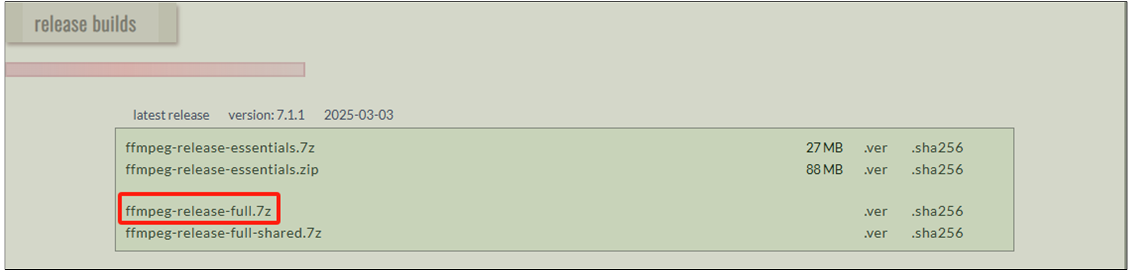
FFmpeg Executable File Download
FFmpeg Command Reference Code
As mentioned above, the transcoded AVI format files are YUYV format video frames and MP3 encoded audio frames. The reference transcoding code is as follows:
ffmpeg -i input.mp4 -ss 00:09:30 -t 00:00:11 -vf "scale=-1:454, crop=454:454:176.5:0" -c:v rawvideo -r 20 -pix_fmt yuyv422 -c:a libmp3lame -b:a 192k -ar 44100 -ac 2 output.avi
Parameter explanation:
-i input file: Input file.
-ss 00:09:30: Start time.
-t 00:00:11: Duration.
-vf 'scale=-1:454, crop=454:454:176.5:0': Video size and crop range, format is scale=w:h, crop=w:h:x:y. -1 indicates width is proportionally scaled with height.
-c:v rawvideo: Specifies the video stream encoding as rawvideo.
-r 20: Output video is 20 frames.
-pix_fmt yuyv422: Output video stream format is yuyv422.
-c:a libmp3lame: Specifies the audio stream encoding as libmp3lame.
-b:a 192k MP3: Bit rate is 192k.
-ar 44100 MP3: Sampling frequency is 44100.
-ac 2: MP3 stereo.
output.avi: Output file.
For more command formats, please refer to FFmpeg documentation
AVI Encapsulation Format
Currently, there are two versions of AVI files:
AVI1.0: The original AVI file encapsulation format. Maximum support is 4GB, typically limited to 2GB for safety reasons.
Open-DML: An extended AVI file encapsulation format, mainly modified to remove file size limitations and reduce overhead, revising the index data structure.
This article does not consider Open-DML format support for now; subsequent parsing instructions will follow the AVI 1.0 format.
AVI Basic Data Structures
The two basic data structures of AVI files are CHUNK and LIST.
typedef struct
{
   DWORD dwFourCC;
   DWORD dwSize;
   BYTE data[dwSize];
}  CHUNK;

typedef struct
{
   DWORD dwList;
   DWORD dwSize;
   DWORD dwFourCC;
   BYTE data[dwSize - 4];
}  LIST;
A chunk contains one chunk of video, audio, or subtitle data, which can be a header or a data frame. dwFourCC indicates the type of the chunk, represented by 4 characters.
For example, strh indicates a chunk stream header, 00dc indicates a chunk of uncompressed video frame, 01wb indicates a chunk of uncompressed audio frame, etc. dwSize represents the actual chunk size starting from data.
A list usually contains information related to the AVI file. dwList can have two values: RIFF or LIST. RIFF indicates the AVI file header, LIST indicates other list headers.
dwFourCC indicates the type of the list, represented by 4 characters. For example, hdrl indicates a header list, movi indicates a data frame list, etc. dwSize represents the actual list size starting from dwFourCC.
AVI File Structure
An AVI file typically consists of the following parts:
'RIFF' list
'RIFF' is the beginning of the entire AVI file, its
dwFourCCis 'AVI' (note there is a space).
'hdrl' list
The 'hdrl' list usually contains an 'avih' chunk, representing the main header of the AVI file. The data structure of 'avih' is defined as follows:
typedef struct
{
   DWORD  dwMicroSecPerFrame;
   DWORD  dwMaxBytesPerSec;
   DWORD  dwPaddingGranularity;
   DWORD  dwFlags;
   DWORD  dwTotalFrames;
   DWORD  dwInitialFrames;
   DWORD  dwStreams;
   DWORD  dwSuggestedBufferSize;
   DWORD  dwWidth;
   DWORD  dwHeight;
   DWORD  dwReserved[4];
} MainAVIHeader;
'strl' list
An AVI file will have a number of 'strl' lists corresponding to the audio streams, video streams, and subtitle streams. Each 'strl' list will contain at least one 'strh' chunk and one 'strf' chunk, which represent the stream header and stream format, respectively. Optional chunks include 'strd' and 'strn', representing additional stream information and stream name. Generally, 'strl' does not include 'strd' and 'strn'.
'strh' data structure definition:
typedef struct
{
   FOURCC fccType;
   FOURCC fccHandler;
   DWORD  dwFlags;
   WORD   wPriority;
   WORD   wLanguage;
   DWORD  dwInitialFrames;
   DWORD  dwTimeScale;
   DWORD  dwRate;
   DWORD  dwStartTime;
   DWORD  dwLength;
   DWORD  dwSuggestedBufferSize;
   DWORD  dwQuality;
   DWORD  dwSampleSize;
   RECT Frame;
}  AVIStreamHeader;
'strf' is defined as different data structures based on whether it is a video stream or an audio stream:
typedef struct
{
   DWORD  headerSize;
   DWORD  biWidth;
   DWORD  biHeight;
   WORD   biPlanes;
   WORD   bitsPerPixel;
   DWORD  biCompression;
   DWORD  biSizeImage;
   DWORD  biXPelsPerMeter;
   DWORD  biYPelsPerMeter;
   DWORD  biClrUsed;
   DWORD  biClrImportant;
} AVIStreamFormatBitMap;

typedef struct
{
   WORD wFormatTag;
   WORD wChannels;
   DWORD dwSamplesPerSec;
   DWORD dwAvgBytesPerSec;
   WORD wBlockAlign;
   WORD wBitsPerSample;
   WORD wSize;
   BYTE reserved[12];
}  AVIStreamFormatAudioWave;
'INFO' list
The 'INFO' list is used to describe information about the AVI file, such as copyright, author, etc. It is not useful for decoding in this context and can be skipped.
'movi' list
The 'movi' list contains data stream chunks:
##dc,##wb,##tx, representing a frame of video stream/audio stream and subtitle stream, respectively. '##' is the stream number, which is related to the order of 'hdrl'. For example, if the first 'hdrl' is a video stream, the 'movi' list will contain several00dcchunks, and if the second 'hdrl' is an audio stream, the 'movi' list will contain several01wbchunks. The chunks in the 'movi' list are data that need to be sent to the audio decoder and video decoder.
'idx1' list
The 'idx1' list contains the index of all the data stream chunks in the 'movi' list. The data structure is as follows:
typedef struct
{
   DWORD dwChunkId;
   DWORD dwFlags;
   DWORD dwOffset;
   DWORD dwSize;
} AVIIndexEntry;
It should be noted that the offset is usually based on the position of
movi.
'JUNK' chunk
The 'JUNK' chunk contains some padding data for alignment, which can be skipped directly.
AVI File Parsing Process
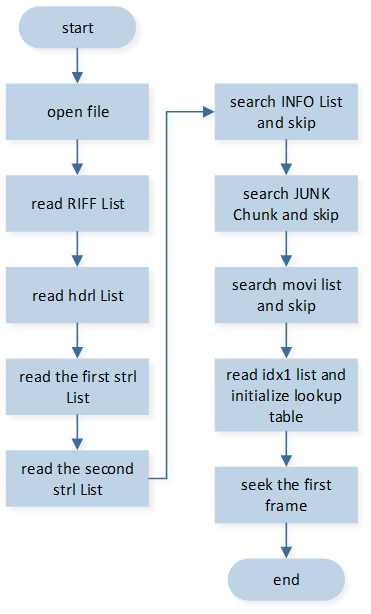
AVI File Parsing Flowchart
Video Playback Function
Video Playback Process
The video playback process can basically be divided into three steps: start playback, update audio and video frames, end playback.
Start Playback: Call
app_video_start(), which allows playback of AVI video files from the specified file system. The video playback process will open an audio track for audio playback and create a realgui img control for video playback. Related operations on the control are performed by sending messages to the GUI task.End Playback: Call
app_video_stop(), to end the video playback process.Update Audio and Video Frames: After the video playback process starts, it is necessary to read video frames from the file system according to the duration of each frame of video playback, update them to the img control; read audio frames, and update them to the audio track.
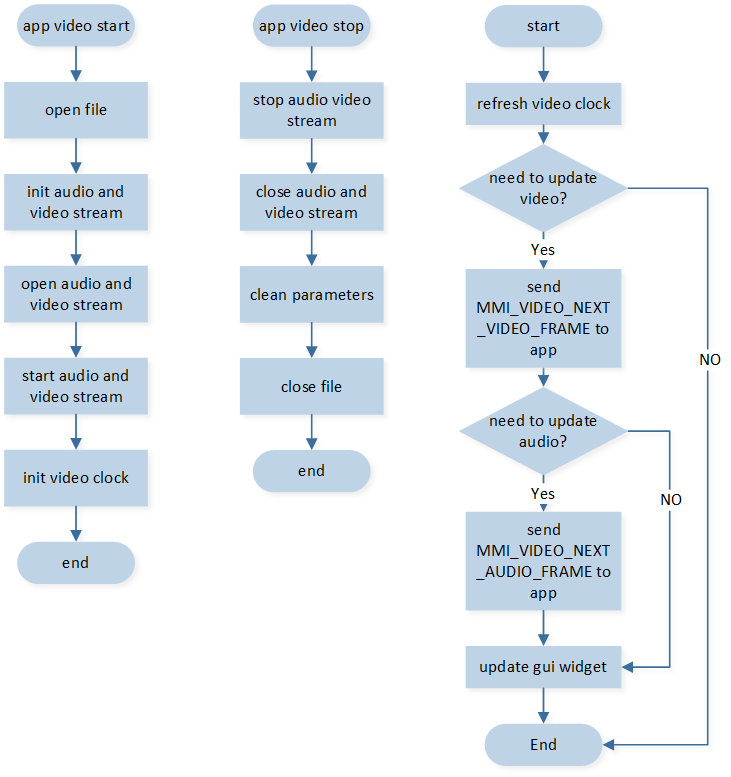
Start Playing - Stop Playing - Update Audio/Video Frames
Note
The process of updating audio and video frames needs to be performed in an animation callback of a control.
app_video_start()andapp_video_stop()need to be called in the APP task.Reading audio and video frames needs to be performed in the APP task.
Video Playback Demo Porting
Update the
filesystem.libto a version that includes avi_parser.Add
app_video.cto the compilation.Port the new command of APP message:
IO_MSG_VIDEO_START: Start specified video playback.
Port the new command of APP MMI:
MMI_VIDEO_STOP: End current video playback.
MMI_VIDEO_NEXT_AUDIO_FRAME: Read several audio frames.
MMI_VIDEO_NEXT_VIDEO_FRAME: Read the next video frame.
-
Implement new and updated GUI events. These three events will send messages to the GUI task for processing during the
app_video_start()andapp_video_stop()processes:GUI_EVENT_VIDEO_CREATE: Create the img control needed for display and set an animation. The animation duration should match the video frame length. Then, close the animation and wait for the next update event.GUI_EVENT_VIDEO_START: Start the update animation.GUI_EVENT_VIDEO_STOP: End the update animation.
-
Implement the GUI update animation callback
gui_video_refresh_cb(). The animation callback needs to:Call
app_video_refresh_clock()to update the video clock.Call
app_video_is_update_video_frame()to determine if the video frame needs updating. If so, sendMMI_VIDEO_NEXT_VIDEO_FRAMEto the APP task.After updating the video frame, call
app_video_is_update_audio_frame()to check if the audio frame needs updating. If so, sendMMI_VIDEO_NEXT_AUDIO_FRAMEto the APP task.Update the control display.
-
Adjust
VIDEO_H_MAXandVIDEO_W_MAXto the desired maximum video size to avoid wasting PSRAM.Note to modify the address of
VIDEO_BUFFER_ADDR_A, which is by default placed afterPSRAM_APP_DEFINED_SECTIONin PSRAM. Feature macro:
F_APP_VIDEO.
RAM And Flash Usage Statistics
-
Usage of PSRAM:
video buffer: pixel + GUI Header + IMDC Header + IMDC addr offset = (W * H * 2) + (8) + (12) + (H + 1) * 4 Byte. For example, a 272 * 272 video size requires 149060 Bytes.
audio buffer: 2 KBytes.
-
Usage of RAM:
T_AV_CONTROLLER + AVIHandle_t + frame index lookup table + FILE = (88) + (116) + (video frames * 8 + audio frames * 8) + (2088).
For example, a 20-second video with a frame rate of 20 and an audio MP3 sample rate of 44100 requires 88 + 116 + 3208 + 6136 + 2088 = 11636 Byte.
In the Demo, a 272 * 272 YUYV422 format video frame was selected, with a video frame rate of 20, audio format of MP3, 192k bitrate, 44100 sample rate, and a duration of 20 seconds, occupying 56.9 MByte.