GATT Over BR/EDR User Guide
GATT Over BR/EDR allows the GATT protocol, originally part of BLE, to be transmitted and used over classic Bluetooth (BR/EDR), thereby enhancing data rate and device compatibility. This document uses the AirSync service as an example to introduce how to implement GATT over BR/EDR based on the SDK.
Note
Directly enable the global macro
F_APP_AIRSYNC_SERVICE_SUPPORT, as the following configurations are already included in the SDK.
-
Configure the
ADV_TYPE_FLAGSfor BLE advertising withoutGAP_ADTYPE_FLAGS_BREDR_NOT_SUPPORTED.static uint8_t adv_data[31] = { 0x02, GAP_ADTYPE_FLAGS, GAP_ADTYPE_FLAGS_GENERAL, ... }
-
The source file and header file for the AirSync service are
airsync_ble_service.candairsync_ble_service.h, respectively. Unlike a regular BLE service, the Attribute flags in the service table need to be configured withATTRIB_FLAG_BREDR.const T_ATTRIB_APPL airsync_ble_service_tbl[] = { /* <<Primary Service>>, 0.. */ { (ATTRIB_FLAG_VALUE_INCL | ATTRIB_FLAG_LE | ATTRIB_FLAG_BREDR), /* wFlags */ { /* bTypeValue */ LO_WORD(GATT_UUID_PRIMARY_SERVICE), HI_WORD(GATT_UUID_PRIMARY_SERVICE), LO_WORD(GATT_UUID_AIRSYNC_SERVICE), /* service UUID */ HI_WORD(GATT_UUID_AIRSYNC_SERVICE) }, UUID_16BIT_SIZE, /* bValueLen */ NULL, /* pValueContext */ GATT_PERM_READ /* wPermissions */ }, ... };
-
Add the service in
app_ble_service.cand callbt_att_init()to initialize ATT and register the callback.#include "bt_att.h" #include "airsync_ble_service.h" // add service id T_SERVER_ID air_ser_id; //callback function void att_callback(uint8_t bd_addr[6], T_BT_ATT_MSG_TYPE msg_type, void *p_msg) { APP_PRINT_INFO1("att_callback msg_type = 0x%x", msg_type); } void app_ble_service_init(void) { //init bt att bt_att_init(att_callback); //add service air_ser_id = airsync_add_service((void *)app_profile_callback); }
-
Add the SDP table for the AirSync service in
app_sdp.c.static const uint8_t att_sdp_record[] = { SDP_DATA_ELEM_SEQ_HDR, 0x2b, //attribute SDP_ATTR_SRV_CLASS_ID_LIST SDP_UNSIGNED_TWO_BYTE, (uint8_t)(SDP_ATTR_SRV_CLASS_ID_LIST >> 8), (uint8_t)SDP_ATTR_SRV_CLASS_ID_LIST, SDP_DATA_ELEM_SEQ_HDR, 0x03, SDP_UUID16_HDR, //According to UUID (uint8_t)(0xFEE7 >> 8), (uint8_t)(0xFEE7), //attribute SDP_ATTR_PROTO_DESC_LIST SDP_UNSIGNED_TWO_BYTE, (uint8_t)(SDP_ATTR_PROTO_DESC_LIST >> 8), (uint8_t)SDP_ATTR_PROTO_DESC_LIST, SDP_DATA_ELEM_SEQ_HDR, 0x13, SDP_DATA_ELEM_SEQ_HDR, 0x06, SDP_UUID16_HDR, (uint8_t)(UUID_L2CAP >> 8), (uint8_t)(UUID_L2CAP), SDP_UNSIGNED_TWO_BYTE, (uint8_t)(PSM_ATT >> 8), (uint8_t)(PSM_ATT), SDP_DATA_ELEM_SEQ_HDR, 0x09, SDP_UUID16_HDR, (uint8_t)(UUID_ATT >> 8), (uint8_t)(UUID_ATT), SDP_UNSIGNED_TWO_BYTE, //According to service start handle 0x00, 0x10, SDP_UNSIGNED_TWO_BYTE, //According to service end handle 0x00, 0x18, //attribute SDP_ATTR_BROWSE_GROUP_LIST SDP_UNSIGNED_TWO_BYTE, (uint8_t)(SDP_ATTR_BROWSE_GROUP_LIST >> 8), (uint8_t)SDP_ATTR_BROWSE_GROUP_LIST, SDP_DATA_ELEM_SEQ_HDR, 0x03, SDP_UUID16_HDR, (uint8_t)(UUID_PUBLIC_BROWSE_GROUP >> 8), (uint8_t)(UUID_PUBLIC_BROWSE_GROUP), }; void app_sdp_init(void) { ...... bt_sdp_record_add((void *)att_sdp_record); }
-
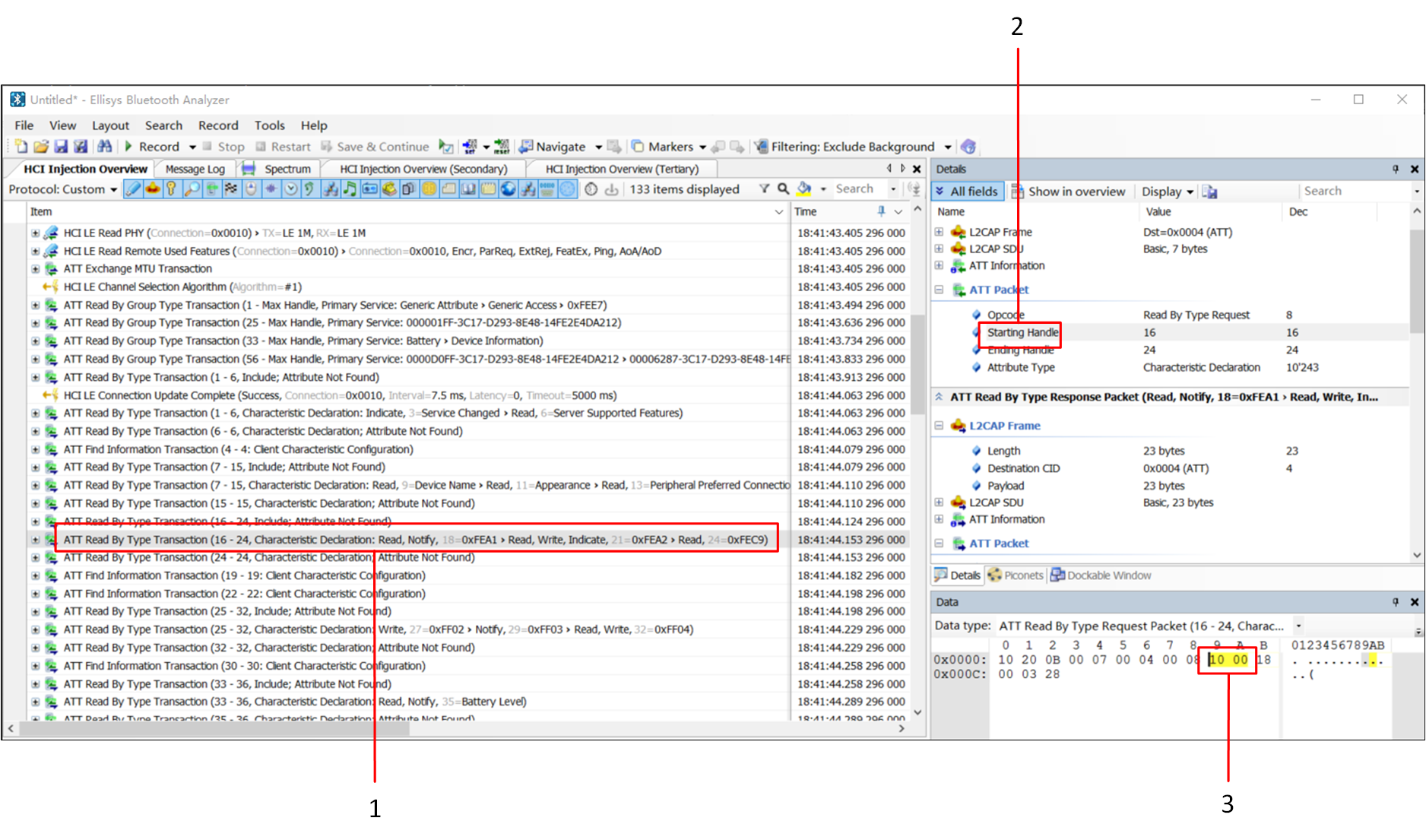
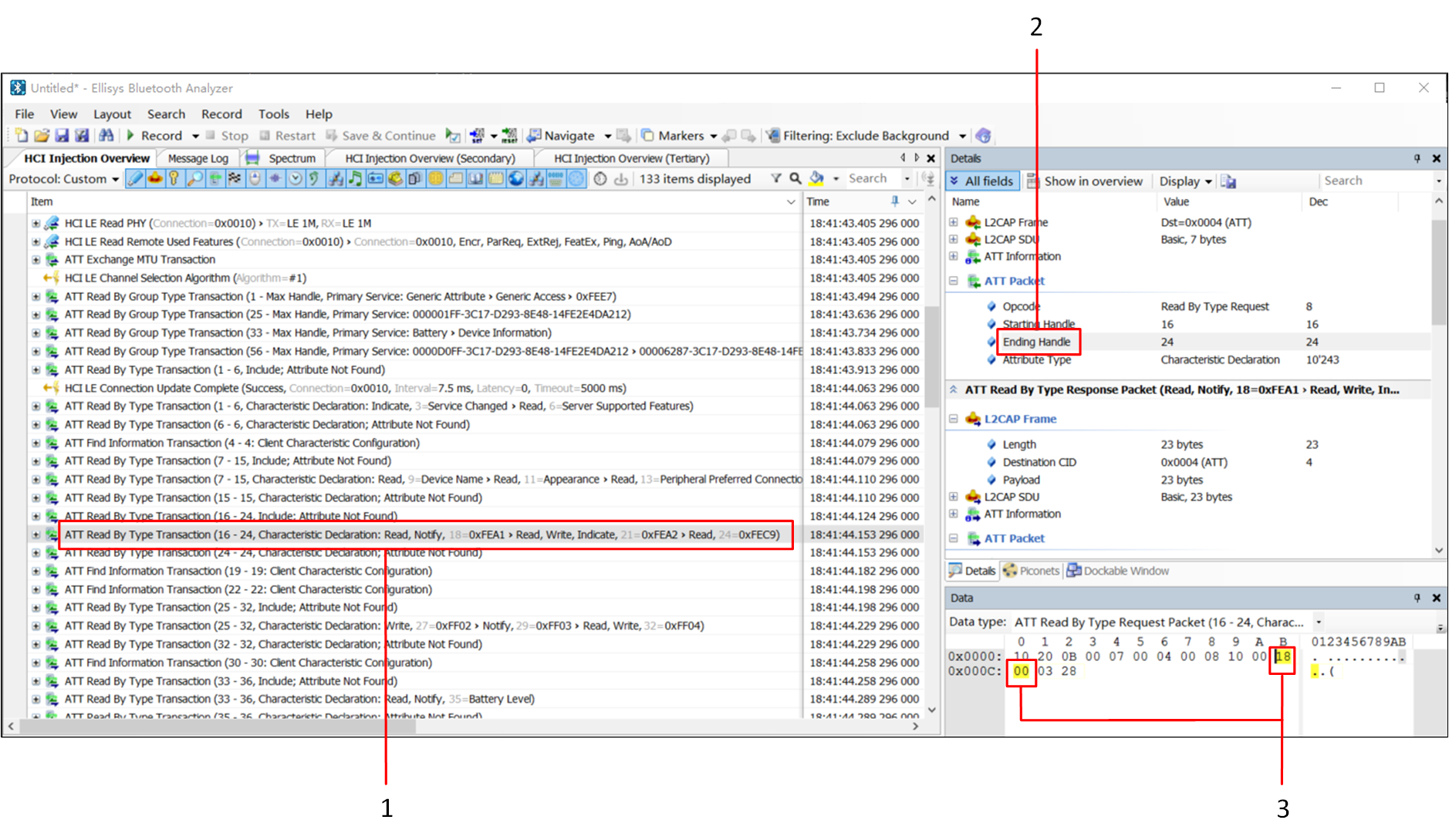
For the above SDP table, you need to fill in the start handle and end handle, introducing two methods to obtain the handle:
Use the function
server_get_start_handle(service id)to get the start handle, and calculate the end handle based on the registered service table.-
Open the
.cfafile in Ellisys Bluetooth Analyzer.exe, select ATT Read Type Transaction, and read the values in sequence 3 in the figure to fill in the initial handle position of the SDP table. If the registered service changes, it needs to be refilled.
-
-
Call
server_ext_send_data()to send Notification/Indication.uint16_t conn_handle; uint16_t cid; uint8_t cid_num; for (uint8_t i = 0; i < MAX_BR_LINK_NUM; i++) { if (app_db.br_link[i].used == true) { gap_chann_get_handle(app_db.br_link[i].bd_addr, 0x10/*BTIF_REMOTE_ADDR_CLASSIC*/, &conn_handle); gap_chann_get_cid(conn_handle, 1, &cid, &cid_num); server_ext_send_data(conn_handle, cid, airsync_ser_id, 2, p_data, data_len, GATT_PDU_TYPE_ANY); break; } } //le notification server_send_data(conn_id, airsync_ser_id, 2, p_data, data_len, GATT_PDU_TYPE_NOTIFICATION);
Note
If there is a situation where ATT cannot connect properly, try using HFP to connect and then actively initiate an ATT connection after a delay of approximately 5 seconds by calling
bt_att_connect_req().The above AirSync service, transmitted via GATT over BR/EDR, is suitable for Android WeChat Sports, while iOS WeChat Sports can still use BLE.