3D Model
Lite3D is a lightweight, cross-platform 3D graphics rendering library independently developed by Realtek. It supports software rendering and hardware acceleration extensions with the following features:
Lite3D supports loading multiple 3D model formats to meet the needs of different application scenarios:
Static Models: Supports loading static 3D models from
.objand.mtlfiles, allowing for precise handling of model geometry and material information.Skeletal Animation Models: Supports loading the
.gltfformat, enabling the rendering of 3D models with skeletal animations to deliver more dynamic and richer visual effects in applications.
The engine's workflow is as follows:

Lite3D Workflow
3D Model Asset Processing
OBJ Static Model
OBJ is a widely used static model file format, suitable for scenarios that do not require complex animations, such as product showcases or UI decorative elements.
A complete OBJ model typically consists of the following three core components:
-
.obj File
-
This is the main file of the model, storing its geometric data. Its content includes:
Vertex coordinates
Normal vectors
Texture coordinates (UV mapping)
Face definitions
It must reference the material information in the
.mtlfile.
-
-
.mtl File (Material Library)
Defines the optical properties of the model's surfaces. Its content includes:
Ambient/Diffuse/Specular colors
Refractive index
Transparency
Illumination model
Texture map references
-
Texture Images
Usually in PNG format, these images are used to enhance the surface detail and realism of the model. Common map types include:
Diffuse maps
Normal maps
Specular maps
Transparency maps
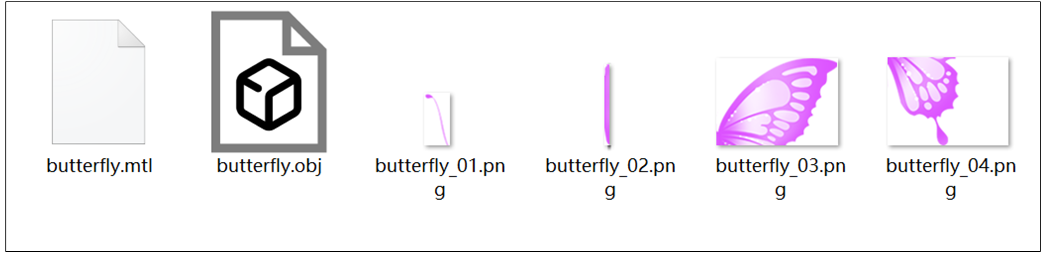
Example of OBJ Model Components
GLTF Skeletal Animation Model
GLTF (GL Transmission Format) is an open standard designed for the efficient transmission and loading of 3D scenes and models. It is often hailed as the 'JPEG of 3D' and is particularly suitable for rendering dynamic models that contain skeletal animations.
A complete GLTF model typically consists of the following three core components:
.gltffile: A JSON-formatted file that describes the scene's hierarchy and constituent elements in a structured manner.
.binfile: Contains the model's binary data, such as vertex coordinates, normal vectors, and texture coordinates.All referenced texture images: Such as textures in PNG format.
Its core data components include:
Scene Graph: A hierarchical structure composed of Nodes, defining the position, rotation, and scale of the model's various parts.
Mesh: The model's geometric information, including vertex attributes (coordinates, normals, UVs) and indices.
Material: Physically Based Rendering (PBR) properties, such as base color, metallic, roughness, etc.
Skin: Defines the key parts of the skeletal animation, containing the hierarchy of bone Joints and their Inverse Bind Matrices.
Animation: Stores keyframe data for the transformation (translation, rotation, scale) of nodes (bones) over time.
Texture: Image data referenced by materials.
Model Preprocessing
Before a 3D model can be rendered, it needs to be converted into a binary format. The following is the processing workflow:
-
Locate Conversion Tools
Find the following tools in the HoneyGUI installation directory:
your_HoneyGUI_dir\tool\3D-tool\extract_desc.exeyour_HoneyGUI_dir\tool\image-convert-tool\image_converter.py
-
Prepare the Model Files
Copy your model files to the
tool\3D-tooldirectory.-
For OBJ models, ensure the directory contains:
.objfile.mtlfileAll referenced texture images
-
For GLTF models, ensure the directory contains:
.gltffile.binfileAll referenced texture images
-
-
Generate Descriptor File
Open a command line terminal in the
tool\3D-tooldirectory and run:-
Processing OBJ Model
Run the command: extract_desc_v3.exe your_model.obj or use the Python version python extract_desc_v3.py your_model.obj .
The tool will ask if you want to convert textures:
Press Enter or type
Y- Automatically convert all PNG textures to bin formatType
N- Skip conversion (already converted or no textures needed)

Script Processing
After execution,
desc_xxx.txtanddesc_xxx.binfiles will be generated. These files contain the parsed obj, mtl data, and the embedded texture data in binary format.
Generating Binary Files
-
Processing GLTF Model
Run the command: extract_desc_v3.exe xxx.gltf or python extract_desc_v3.py your_model.obj. This command will also automatically process all referenced texture images.
After execution,
gltf_desc_xxx.txtandgltf_desc_xxx.binfiles will be generated. These files contain the parsed gltf, bin data, and the embedded texture data.
-
3D Model Generation
Create Model
Both OBJ and GLTF models can be created using the function l3_create_model(void *desc_addr, L3_DRAW_TYPE draw_type, int16_t x, int16_t y, int16_t view_w, int16_t view_h).
Parameter Description:
desc_addr: Pointer to the address of the parsed data extracted by the script.-
draw_type: The rendering method for the model:L3_DRAW_FRONT_ONLY: Renders only the front of the model, suitable for scenarios like a butterfly model where the back needs to be hidden.L3_DRAW_FRONT_AND_BACK: Renders both the front and the back of the model, suitable for scenarios where both sides need to be visible, like a prism model.L3_DRAW_FRONT_AND_SORT: Renders the front of the model with sorting, suitable for scenarios with foreground and background occlusion, like a face model.
x,y: The top-left coordinates of the model's viewport on the screen.view_w,view_h: The width and height of the model's viewport.
Transformation Control
Global Transformation
Global transformation applies a uniform matrix transformation to all vertices of the model, commonly used to implement the overall rotation, translation, and scaling of the model.
void l3_set_global_transform(l3_model_base_t *_this, l3_global_transform_cb cb);
The user needs to implement a callback function of type l3_global_transform_cb, and define the transformation logic within it, such as the world transformation for world coordinates and the camera projection for the camera view.
Typical use cases:
Overall rotation/translation of the model
Scene perspective switching
Camera Transformation
The initialization function is l3_camera_UVN_initialize(l3_camera_t *camera, l3_4d_point_t cameraPosition, l3_4d_point_t cameraTarget, float near, float far, float fov, float viewPortWidth, float viewPortHeight).
camera: A pointer to the camera structure, used to initialize camera properties.cameraPosition: The position of the camera in world coordinates.cameraTarget: The target point the camera is directed at, i.e., the focal point of the camera's line of sight.near: The near clipping plane distance, defining the distance from the camera to the near plane of the camera's view frustum. Objects closer than this distance will be clipped.far: The far clipping plane distance, defining the distance from the camera to the far plane of the view frustum. Objects farther than this distance will be clipped.fov: The field of view, usually expressed as a vertical angle (in degrees), defining the openness of the camera, i.e., the opening angle of the camera's view frustum.viewPortWidth: The width of the viewport, defining the horizontal size of the rendering target or window.viewPortHeight: The height of the viewport, defining the vertical size of the rendering target or window.
Purpose:
Camera transformation defines the observer's position and direction in the scene, transforming the world coordinate system to the camera coordinate system.
By manipulating the camera, different perspectives can be achieved, such as translating the camera position or changing the viewing direction.
World Transformation
The initialization function is l3_world_initialize(l3_4x4_matrix_t *world, float x, float y, float z, float rotX, float rotY, float rotZ, float scale).
world: A pointer to the world transformation matrix, which transforms the 3D object from model coordinates to world coordinates.x: The distance of translation along the X-axis, used to determine the object's position in the X direction within the world coordinate system.y: The distance of translation along the Y-axis, used to determine the object's position in the Y direction within the world coordinate system.z: The distance of translation along the Z-axis, used to determine the object's position in the Z direction within the world coordinate system.rotX: The angle of rotation around the X-axis (in degrees).rotY: The angle of rotation around the Y-axis (in degrees).rotZ: The angle of rotation around the Z-axis (in degrees).scale: A uniform scaling factor used to proportionally scale the object in all directions.
Purpose:
The world transformation defines the model's position and orientation in the world coordinate system, responsible for converting the model coordinate system to the world coordinate system.
Through the world transformation matrix, the overall translation, rotation, and scaling of the model can be achieved.
Face Transformation
Supports applying local transformations to the model.
void l3_set_face_transform(l3_model_base_t *_this, l3_face_transform_cb cb);
The callback function of type l3_face_transform_cb can set a different shape transformation for each face of the object, where face_index specifies the face to be transformed.
Features:
Supports independent control by face index.
Use
l3_calculator_4x4_matrix(l3_4x4_matrix_t *matrix, float tx, float ty, float tz, l3_4d_point_t point, l3_4d_vector_t vector, float degrees, float scale)to generate different matrices for each face, enabling customized local animations.
3D Model Rendering
Create Widget
The Lite3D library has been integrated into HoneyGUI and is encapsulated as the gui_lite3d widget. The gui_lite3d_create() function can be used to create widgets for 3D models.
Set Click Event
The gui_lite3d_on_click() function can set a click event for the 3D model widget. When a user clicks the model, a callback function is triggered.
Set Animations
The function gui_obj_create_timer() can be used to set animation properties for the 3D model widget, where callback is the animation update callback function.
Example
3D Butterfly
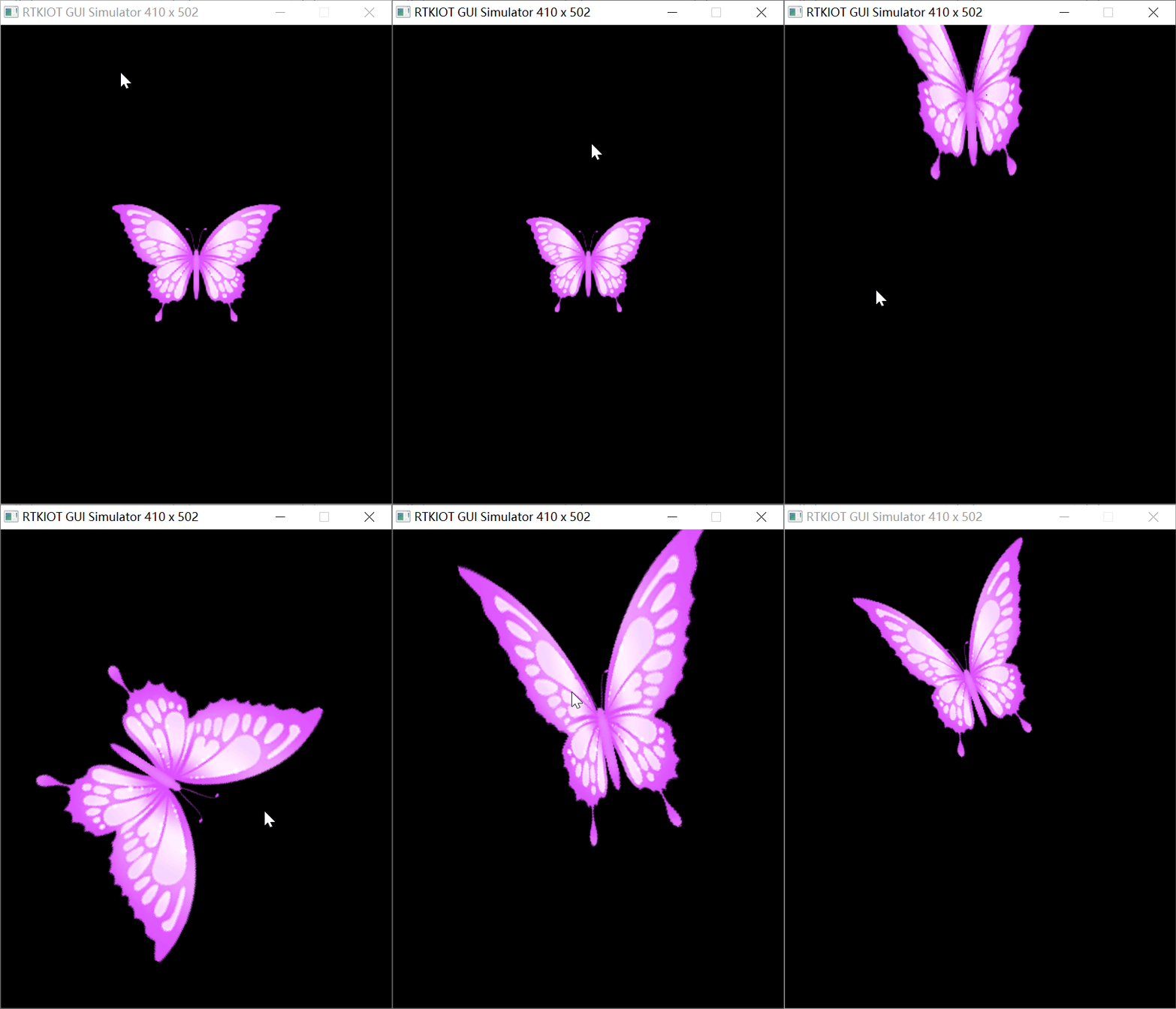
This model consists of 8 rectangular faces, each with a corresponding texture map, and uses the L3_DRAW_FRONT_ONLY rendering method. By calling the function l3_set_face_transform(l3_model_base_t *_this, l3_face_transform_cb cb), you can set local transformations for different faces to achieve animation effects.
/*============================================================================*
* Header Files
*============================================================================*/
#include "root_image/ui_resource.h"
#include "gui_img.h"
#include "gui_win.h"
#include "gui_text.h"
#include "time.h"
#include "tp_algo.h"
#include <math.h>
#include "app_main_watch.h"
#include "gui_view.h"
#include "gui_lite3d.h"
/*============================================================================*
* Macros
*============================================================================*/
#define CURRENT_VIEW_NAME "butterfly_view"
/*============================================================================*
* Function Declaration
*============================================================================*/
static void butterfly_app(gui_view_t *view);
/*============================================================================*
* Variables
*============================================================================*/
/* View Management */
static gui_view_t *current_view = NULL;
static gui_view_descriptor_t const descriptor =
{
/* change Here for current view */
.name = (const char *)CURRENT_VIEW_NAME,
.pView = ¤t_view,
.on_switch_in = butterfly_app,
};
/* Animation Variables */
static float wing_angle = 0.0f;
static float butterfly_x = 0.0f;
static float butterfly_y = 0.0f;
static float butterfly_z = 0.0f;
static float butterfly_rz = 0.0f;
bool is_moving_to_target = false;
static float target_dx = 0.0f;
static float target_dy = 0.0f;
static float source_dx = 0.0f;
static float source_dy = 0.0f;
static const float move_speed = 0.02f;
static float wing_time = 0.0f;
static float total_flight_distance = 0.0f;
static float flight_progress = 1.0f;
/*============================================================================*
* Private Functions
*============================================================================*/
static int gui_view_descriptor_register_init(void)
{
gui_view_descriptor_register(&descriptor);
gui_log("File: %s, Function: %s\n", __FILE__, __func__);
return 0;
}
static GUI_INIT_VIEW_DESCRIPTOR_REGISTER(gui_view_descriptor_register_init);
static void update_animation(void *param)
{
touch_info_t *tp = tp_get_info();
gui_dispdev_t *dc = gui_get_dc();
(void)param;
if (tp->pressed)
{
target_dx = (tp->x - dc->screen_width / 2) / 4.0f;
target_dy = (tp->y - dc->screen_height / 2) / 4.0f;
is_moving_to_target = true;
float dx = target_dx - source_dx;
float dy = target_dy - source_dy;
total_flight_distance = sqrtf(dx * dx + dy * dy);
flight_progress = 0.0f;
}
if (is_moving_to_target)
{
float current_dx = target_dx - source_dx;
float current_dy = target_dy - source_dy;
float remaining_distance = sqrtf(current_dx * current_dx + current_dy * current_dy);
flight_progress = fminf(1.0f - (remaining_distance / total_flight_distance), 1.0f);
if (flight_progress < 0.8f)
{
// Acceleration and deceleration
// float speed_factor = fminf(remaining_distance / 40.0f, 1.0f);
source_dx += current_dx * move_speed * (1.0f - flight_progress);
source_dy += current_dy * move_speed * (1.0f - flight_progress);
// Caculate new rotate angle
float desired_angle = atan2f(current_dy, current_dx) * (180.0f / M_PI_F) + 90;
float angle_difference = desired_angle - butterfly_rz;
if (angle_difference > 180.0f)
{
angle_difference -= 360.0f;
}
if (angle_difference < -180.0f)
{
angle_difference += 360.0f;
}
butterfly_rz += angle_difference * 0.1f;
// Adjust wing flapping frequency based on speed
wing_time += 0.2f + (1.0f - flight_progress) * 0.2f;
wing_angle = 60.0f * sinf(wing_time);
butterfly_x = source_dx;
butterfly_y = source_dy;
butterfly_z = 30.0f * (4.0f * flight_progress * (0.8f - flight_progress));
}
else
{
is_moving_to_target = false;
}
}
else
{
wing_time += 0.1f;
wing_angle = 50.0f * sinf(wing_time);
butterfly_z = -5.0f * sinf(wing_time);
}
}
static void butterfly_global_cb(l3_model_base_t *this)
{
l3_camera_UVN_initialize(&this->camera, l3_4d_point(0, 0, 0), l3_4d_point(0, 0, 45), 1,
32767,
90, this->viewPortWidth, this->viewPortHeight);
l3_world_initialize(&this->world, butterfly_x, butterfly_y, 45.0f - butterfly_z, 0, 0, butterfly_rz,
5);
}
static l3_4x4_matrix_t butterfly_face_cb(l3_model_base_t *this, size_t face_index/*face offset*/)
{
l3_4x4_matrix_t face_matrix;
l3_4x4_matrix_t transform_matrix;
if (face_index == 0 || face_index == 2)
{
l3_calculator_4x4_matrix(&face_matrix, 0, 0, 0, l3_4d_point(0, 0, 0), l3_4d_vector(0, 1, 0),
wing_angle, 1);
}
else if (face_index == 1 || face_index == 3)
{
l3_calculator_4x4_matrix(&face_matrix, 0, 0, 0, l3_4d_point(0, 0, 0), l3_4d_vector(0, 1, 0),
-wing_angle, 1);
}
else
{
l3_calculator_4x4_matrix(&face_matrix, 0, 0, 0, l3_4d_point(0, 0, 0), l3_4d_vector(0, 1, 0), 0,
1);
}
l3_4x4_matrix_mul(&this->world, &face_matrix, &transform_matrix);
return transform_matrix;
}
static void butterfly_app(gui_view_t *view)
{
gui_view_t *view_c = gui_view_get_current();
if (view_c && view_c->descriptor == gui_view_descriptor_get("menu_view"))
{
gui_obj_add_event_cb(view, click_button_back_2_watchface_or_menu, GUI_EVENT_KB_SHORT_PRESSED, NULL);
gui_obj_add_event_cb(view, slide_back_2_menu, GUI_EVENT_TOUCH_RIGHT_SLIDE_QUICK, NULL);
gui_obj_add_event_cb(view, slide_back_2_menu, GUI_EVENT_TOUCH_LEFT_SLIDE_QUICK, NULL);
gui_obj_focus_set(view);
}
gui_obj_t *obj = GUI_BASE(view);
l3_model_base_t *butterfly_3d = l3_create_model(DESC_BUTTERFLY_BIN, L3_DRAW_FRONT_ONLY, 0, 0, 410,
502);
l3_set_global_transform(butterfly_3d, (l3_global_transform_cb)butterfly_global_cb);
l3_set_face_transform(butterfly_3d, (l3_face_transform_cb)butterfly_face_cb);
gui_lite3d_t *lite3d_butterfly = gui_lite3d_create(obj, "lite3d-widget", butterfly_3d,
0, 0, 410, 502);
gui_obj_create_timer(GUI_BASE(lite3d_butterfly), 10, true, update_animation);
}
3D Face
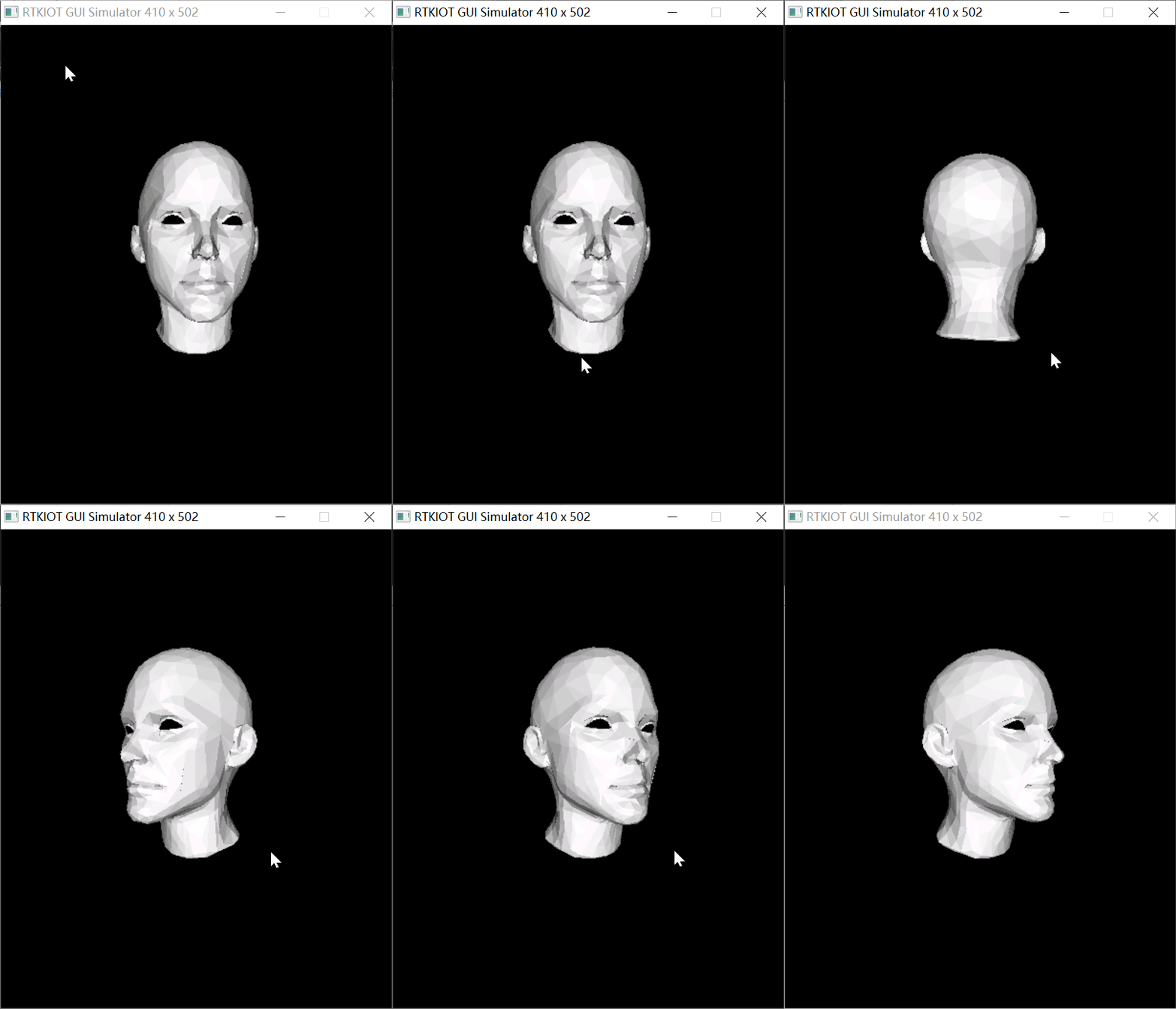
This model consists of 1454 triangular faces and is filled with a default material base color. The rendering method used is L3_DRAW_FRONT_AND_SORT.
/*============================================================================*
* Header Files
*============================================================================*/
#include "root_image/ui_resource.h"
#include "gui_img.h"
#include "gui_win.h"
#include "gui_text.h"
#include "time.h"
#include "tp_algo.h"
#include <math.h>
#include "app_main_watch.h"
#include "gui_view.h"
#include "gui_lite3d.h"
/*============================================================================*
* Macros
*============================================================================*/
#define CURRENT_VIEW_NAME "face_view"
/*============================================================================*
* Function Declaration
*============================================================================*/
static void face_app(gui_view_t *view);
/*============================================================================*
* Variables
*============================================================================*/
/* View Management */
static gui_view_t *current_view = NULL;
static gui_view_descriptor_t const descriptor =
{
/* change Here for current view */
.name = (const char *)CURRENT_VIEW_NAME,
.pView = ¤t_view,
.on_switch_in = face_app,
};
/* Animation Variables */
static float rot_angle = 5.0f;
/*============================================================================*
* Private Functions
*============================================================================*/
static int gui_view_descriptor_register_init(void)
{
gui_view_descriptor_register(&descriptor);
gui_log("File: %s, Function: %s\n", __FILE__, __func__);
return 0;
}
static GUI_INIT_VIEW_DESCRIPTOR_REGISTER(gui_view_descriptor_register_init);
static void update_face_animation(void *param)
{
touch_info_t *tp = tp_get_info();
(void)param;
if (tp->pressed || tp->pressing)
{
if (tp->x > 20 && tp->x < 390)
{
rot_angle += tp->deltaX / 5.0f;
}
}
}
static void face_global_cb(l3_model_base_t *this)
{
l3_camera_UVN_initialize(&this->camera, l3_4d_point(0, 0, 0), l3_4d_point(0, 0, 1), 1,
32767,
90, this->viewPortWidth, this->viewPortHeight);
l3_world_initialize(&this->world, 0, 0, 37, 0, rot_angle, 0, 5);
}
static void face_app(gui_view_t *view)
{
gui_view_t *view_c = gui_view_get_current();
if (view_c && view_c->descriptor == gui_view_descriptor_get("menu_view"))
{
gui_obj_add_event_cb(view, click_button_back_2_watchface_or_menu, GUI_EVENT_KB_SHORT_PRESSED, NULL);
gui_obj_add_event_cb(view, slide_back_2_menu, GUI_EVENT_TOUCH_RIGHT_SLIDE_QUICK, NULL);
gui_obj_add_event_cb(view, slide_back_2_menu, GUI_EVENT_TOUCH_LEFT_SLIDE_QUICK, NULL);
gui_obj_focus_set(view);
}
gui_obj_t *obj = GUI_BASE(view);
l3_model_base_t *face_3d = l3_create_model(DESC_FACE_BIN, L3_DRAW_FRONT_AND_SORT, 0, 0, 410, 502);
l3_set_global_transform(face_3d, (l3_global_transform_cb)face_global_cb);
gui_lite3d_t *lite3d_face = gui_lite3d_create(obj, "lite3d-widget", face_3d,
0, 0, 410, 502);
gui_obj_create_timer(GUI_BASE(lite3d_face), 10, true, update_face_animation);
}
3D Dog
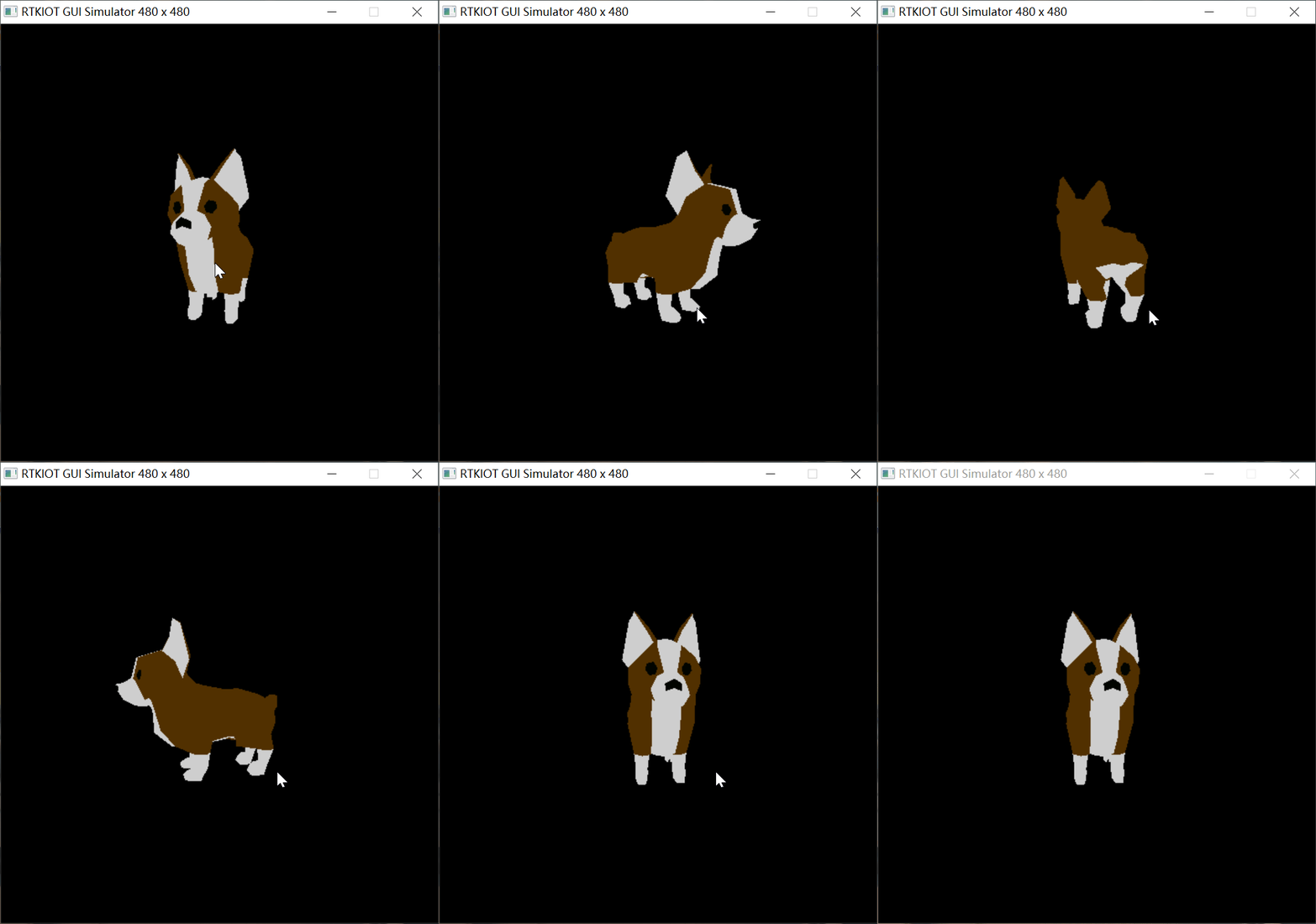
To run this example, enable the Kconfig option via menuconfig and save to win32_sim/.config. The model consists of 774 triangular surfaces and supports filling with a custom material base color.
#include "guidef.h"
#include "gui_img.h"
#include "gui_obj.h"
#include "string.h"
#include "stdio.h"
#include "stdlib.h"
#include "gui_server.h"
#include "gui_components_init.h"

#include "gui_lite3d.h"
#include "tp_algo.h"
#include "dog3d/desc_dog.txt"

static float rot_angle = 0.0f;

static void update_dog_animation(void *param)
{
    (void)param;


    touch_info_t *tp = tp_get_info();

    if (tp->pressed || tp->pressing)
    {
        rot_angle += tp->deltaX / 5.0f;
    }
}

static void dog_global_cb(l3_model_base_t *this)
{
    l3_camera_UVN_initialize(&this->camera, l3_4d_point(0, 0, 0), l3_4d_point(0, 3, 30), 1, 32767,
                             90,  this->viewPortWidth, this->viewPortHeight);

    l3_world_initialize(&this->world, 0, 15, 30, 0, rot_angle, 0, 5);
}

static int app_init(void)
{
    l3_model_base_t *dog_3d = l3_create_model((void *)_acdesc_dog, L3_DRAW_FRONT_AND_SORT, 50, 50, 380,
                                              380);

    l3_set_global_transform(dog_3d, (l3_global_transform_cb)dog_global_cb);

    gui_lite3d_t *lite3d_dog = gui_lite3d_create(gui_obj_get_root(), "lite3d-widget", dog_3d,
                                                 0, 0, 480, 480);

    gui_obj_create_timer(GUI_BASE(lite3d_dog), 17, true, update_dog_animation);


    return 0;

}
3D Application List
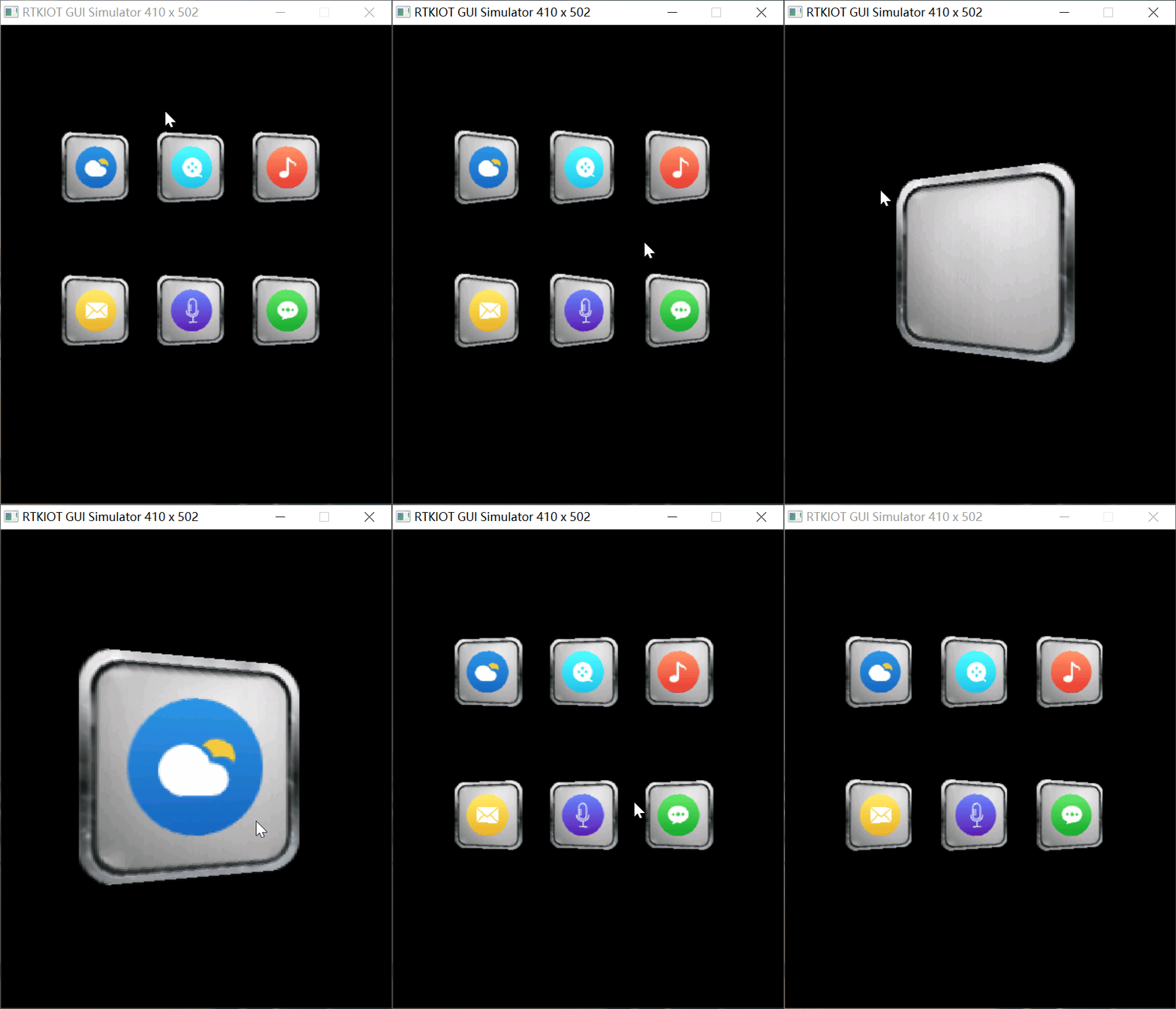
This interface consists of 6 3D application icons. By calling the function l3_set_face_image(l3_model_base_t *_this, uint8_t face_index, void *image_addr), you can replace the texture map of a specified face of the 3D model.
/*============================================================================*
* Header Files
*============================================================================*/
#include "root_image/ui_resource.h"
#include "gui_img.h"
#include "gui_win.h"
#include "gui_text.h"
#include "time.h"
#include "tp_algo.h"
#include <math.h>
#include "app_main_watch.h"
#include "gui_view.h"
#include "gui_lite3d.h"
/*============================================================================*
* Macros
*============================================================================*/
#define CURRENT_VIEW_NAME "applist_view"
#define APP_NUM 6
/*============================================================================*
* Types
*============================================================================*/
typedef struct
{
int16_t pos_x;
int16_t pos_y;
} Position;
/*============================================================================*
* Function Declaration
*============================================================================*/
static void applist_app(gui_view_t *view);
/*============================================================================*
* Variables
*============================================================================*/
/* View Management */
static gui_view_t *current_view = NULL;
static gui_view_descriptor_t const descriptor =
{
/* change Here for current view */
.name = (const char *)CURRENT_VIEW_NAME,
.pView = ¤t_view,
.on_switch_in = applist_app,
};
/* 3D Applications List */
static gui_lite3d_t *app_3d_list[APP_NUM]; // Static array
static const Position app_positions[APP_NUM] =
{
{0, 50},
{100, 50},
{200, 50},
{0, 200},
{100, 200},
{200, 200}
};
/* Animation Variables */
static float rot_y_angle = 0.0f; // Current angle
static float velocity = 0.0f; // Angular velocity
static bool isAnimating = false; // Whether animation is ongoing
static const float amplitude = 30.0f; // Initial amplitude
static const float damping =
0.95f; // Damping coefficient (between 0.9~0.99, higher values result in longer oscillation)
static const float frequency =
0.2f; // Oscillation frequency (higher values result in faster oscillation)
static bool click_amplify = false;
static float click_on_rot_y = 0.0f;
static float click_on_shift_z = 0.0f;
/*============================================================================*
* Private Functions
*============================================================================*/
static int gui_view_descriptor_register_init(void)
{
gui_view_descriptor_register(&descriptor);
gui_log("File: %s, Function: %s\n", __FILE__, __func__);
return 0;
}
static GUI_INIT_VIEW_DESCRIPTOR_REGISTER(gui_view_descriptor_register_init);
static void update_applist_animation(void *param)
{
(void)param;
touch_info_t *tp = tp_get_info();
if (tp->pressed)
{
isAnimating = true; // Start animation
rot_y_angle = 0.0f; // Reset angle
velocity = amplitude * frequency; // Initial velocity
}
if (isAnimating)
{
// Harmonic motion + damping decay
float acceleration = -frequency * frequency *
rot_y_angle; // Acceleration (towards equilibrium point)
velocity += acceleration; // Update velocity
velocity *= damping; // Apply damping decay
rot_y_angle += velocity; // Update angle
// Stop animation when oscillation is small enough
if (fabsf(rot_y_angle) < 0.1f && fabsf(velocity) < 0.1f)
{
rot_y_angle = 0.0f; // Ensure complete stop
velocity = 0.0f;
isAnimating = false;
}
}
}
static void applist_global_cb(l3_model_base_t *this)
{
l3_camera_UVN_initialize(&this->camera, l3_4d_point(0, 0, 0), l3_4d_point(0, 0, 15), 1,
32767,
90, this->viewPortWidth, this->viewPortHeight);
l3_world_initialize(&this->world, 0, 0, 15, 0, 0, 0, 5);
}
static l3_4x4_matrix_t applist_face_cb(l3_model_base_t *this, size_t face_index)
{
(void)face_index;
l3_4x4_matrix_t face_matrix;
l3_4x4_matrix_t transform_matrix;
l3_calculator_4x4_matrix(&face_matrix, 0, 0, 0, l3_4d_point(0, 0, 0), l3_4d_vector(0, 1, 0),
rot_y_angle, 1);
l3_4x4_matrix_mul(&this->world, &face_matrix, &transform_matrix);
return transform_matrix;
}
static void app_click_on_cb(l3_model_base_t *this)
{
if (click_on_rot_y < 720.f)
{
click_on_rot_y += 10.0f;
}
if (click_on_shift_z < 5.0f)
{
click_on_shift_z += 0.2f;
}
this->x = 0;
this->y = 46;
this->viewPortWidth = 410;
this->viewPortHeight = 410;
l3_camera_UVN_initialize(&this->camera, l3_4d_point(0, 0, 0), l3_4d_point(0, 0, 15), 1,
32767,
90, this->viewPortWidth, this->viewPortHeight);
l3_world_initialize(&this->world, 0, 0, 15.0f - click_on_shift_z, 0, click_on_rot_y, 0, 5);
}
static int get_app_index(gui_lite3d_t *target)
{
for (int i = 0; i < APP_NUM; i++)
{
if (app_3d_list[i] == target)
{
return i;
}
}
return -1;
}
static void gui_app_switch(gui_lite3d_t *this)
{
gui_log("clicked app: %s\n", this->base.name);
if (!click_amplify)
{
click_amplify = true;
for (int i = 0; i < APP_NUM; i++)
{
gui_lite3d_t *app = app_3d_list[i];
if (app != this)
{
app->base.not_show = true;
}
}
click_on_rot_y = 0.0f;
click_on_shift_z = 0.0f;
l3_set_global_transform(this->model, (l3_global_transform_cb)app_click_on_cb);
}
else
{
click_amplify = false;
int clicked_index = get_app_index(this);
if (clicked_index == -1)
{
gui_log("Error: Target app not found!");
return;
}
this->model->x = app_positions[clicked_index].pos_x;
this->model->y = app_positions[clicked_index].pos_y;
this->model->viewPortWidth = 200;
this->model->viewPortHeight = 200;
l3_set_global_transform(this->model, (l3_global_transform_cb)applist_global_cb);
for (int i = 0; i < APP_NUM; i++)
{
app_3d_list[i]->base.not_show = false;
}
}
}
static void applist_app(gui_view_t *view)
{
gui_view_t *view_c = gui_view_get_current();
if (view_c && view_c->descriptor == gui_view_descriptor_get("menu_view"))
{
gui_obj_add_event_cb(view, click_button_back_2_watchface_or_menu, GUI_EVENT_KB_SHORT_PRESSED, NULL);
gui_obj_add_event_cb(view, slide_back_2_menu, GUI_EVENT_TOUCH_RIGHT_SLIDE_QUICK, NULL);
gui_obj_add_event_cb(view, slide_back_2_menu, GUI_EVENT_TOUCH_LEFT_SLIDE_QUICK, NULL);
gui_obj_focus_set(view);
}
gui_obj_t *obj = GUI_BASE(view);
click_amplify = false;
// App0
l3_model_base_t *app0 = l3_create_model(DESC_APP_BIN, L3_DRAW_FRONT_ONLY,
app_positions[0].pos_x, app_positions[0].pos_y, 200, 200);
app_3d_list[0] = gui_lite3d_create(obj, "app0", app0, 0, 0, 0, 0);
// App1
l3_model_base_t *app1 = l3_create_model(DESC_APP_BIN, L3_DRAW_FRONT_ONLY,
app_positions[1].pos_x, app_positions[1].pos_y, 200, 200);
l3_set_face_image(app1, 5, FILM_BIN);
app_3d_list[1] = gui_lite3d_create(obj, "app1", app1, 0, 0, 0, 0);
// App2
l3_model_base_t *app2 = l3_create_model(DESC_APP_BIN, L3_DRAW_FRONT_ONLY,
app_positions[2].pos_x, app_positions[2].pos_y, 200, 200);
l3_set_face_image(app2, 5, MUSIC_BIN);
app_3d_list[2] = gui_lite3d_create(obj, "app2", app2, 0, 0, 0, 0);
// App3
l3_model_base_t *app3 = l3_create_model(DESC_APP_BIN, L3_DRAW_FRONT_ONLY,
app_positions[3].pos_x, app_positions[3].pos_y, 200, 200);
l3_set_face_image(app3, 5, MAIL_BIN);
app_3d_list[3] = gui_lite3d_create(obj, "app3", app3, 0, 0, 0, 0);
// App4
l3_model_base_t *app4 = l3_create_model(DESC_APP_BIN, L3_DRAW_FRONT_ONLY,
app_positions[4].pos_x, app_positions[4].pos_y, 200, 200);
l3_set_face_image(app4, 5, VOICE_BIN);
app_3d_list[4] = gui_lite3d_create(obj, "app4", app4, 0, 0, 0, 0);
// App5
l3_model_base_t *app5 = l3_create_model(DESC_APP_BIN, L3_DRAW_FRONT_ONLY,
app_positions[5].pos_x, app_positions[5].pos_y, 200, 200);
l3_set_face_image(app5, 5, WECHAT_BIN);
app_3d_list[5] = gui_lite3d_create(obj, "app5", app5, 0, 0, 0, 0);
for (int i = 0; i < APP_NUM; i++)
{
l3_set_global_transform(app_3d_list[i]->model, (l3_global_transform_cb)applist_global_cb);
l3_set_face_transform(app_3d_list[i]->model, (l3_face_transform_cb)applist_face_cb);
gui_lite3d_on_click(app_3d_list[i], (gui_event_cb_t)gui_app_switch, app_3d_list[i]);
}
gui_obj_create_timer(GUI_BASE(app_3d_list[0]), 10, true, update_applist_animation);
}
3D Robot
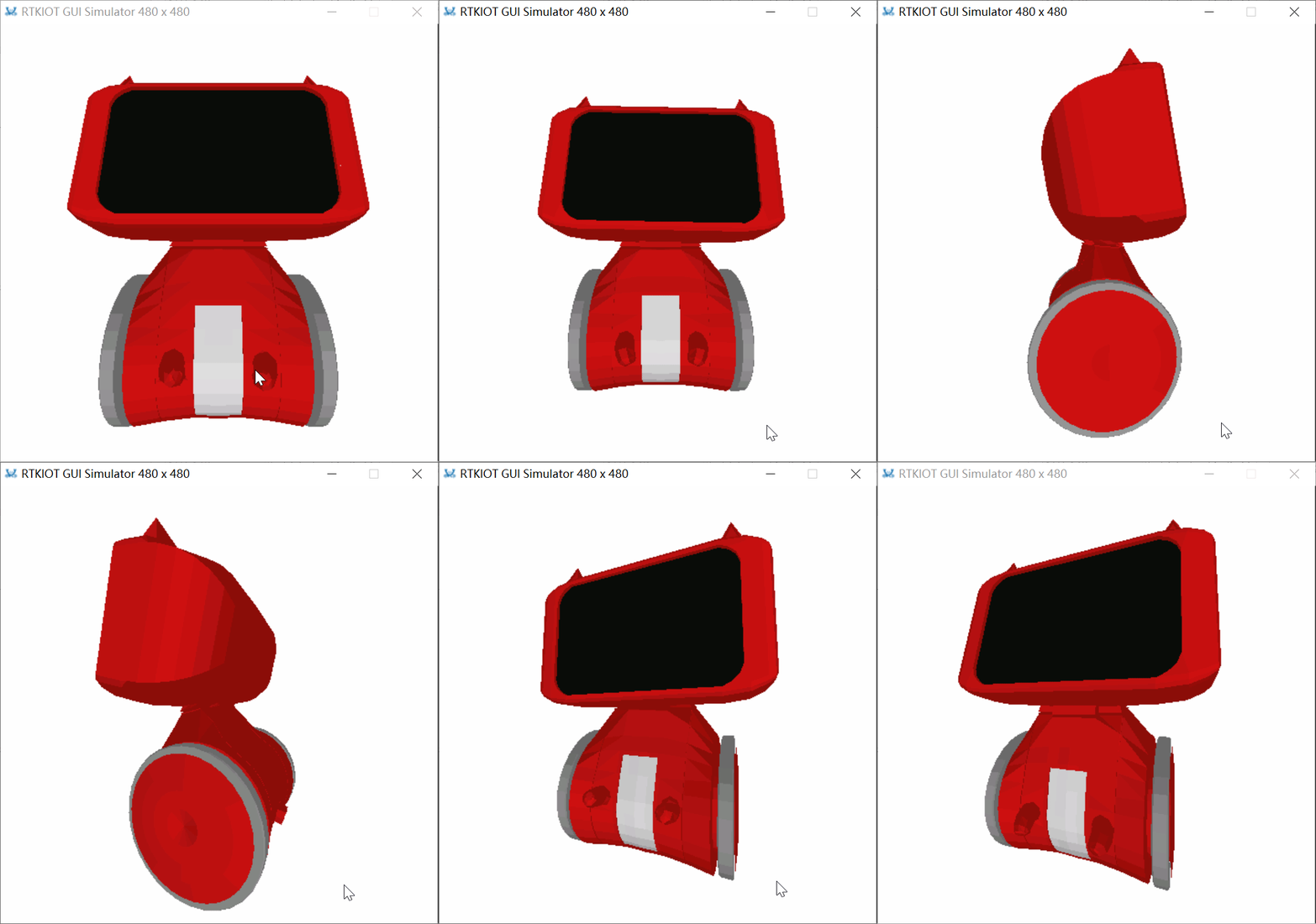
This model is in GLTF format with skeletal animation. Lite3D plays this animation in a loop by default.
#include "guidef.h"
#include "gui_img.h"
#include "gui_obj.h"
#include "string.h"
#include "stdio.h"
#include "stdlib.h"
#include "gui_server.h"
#include "gui_components_init.h"

#include "gui_lite3d.h"
#include "tp_algo.h"
#include "robot_gltf/gltf_desc_robot.txt"

static float rot_angle = 0.0f;


static void update_robot_animation(void *param)
{
    (void)param;


    touch_info_t *tp = tp_get_info();

    if (tp->pressed || tp->pressing)
    {
        rot_angle += tp->deltaX / 5.0f;
    }
}

static void robot_global_cb(l3_model_base_t *this)
{
    l3_camera_UVN_initialize(&this->camera, l3_4d_point(0, 0, 0), l3_4d_point(0, 0, 1), 1,
                             32767,
                             90, this->viewPortWidth, this->viewPortHeight);

    l3_world_initialize(&this->world, 0, 5, 8, 0, rot_angle, 0, 5);
}


static int app_init(void)
{
    gui_dispdev_t *dc = gui_get_dc();

    l3_model_base_t *robot_3d = l3_create_model((void *)_acgltf_desc_robot, L3_DRAW_FRONT_AND_SORT, 0,
                                                0,
                                                dc->screen_width,
                                                dc->screen_height);

    l3_set_global_transform(robot_3d, (l3_global_transform_cb)robot_global_cb);

    gui_lite3d_t *lite3d_robot = gui_lite3d_create(gui_obj_get_root(), "lite3d-widget",
                                                   robot_3d, 0, 0, 0, 0);

    gui_obj_create_timer(GUI_BASE(lite3d_robot), 20, true, update_robot_animation);


    return 0;

}

GUI_INIT_APP_EXPORT(app_init);
FPS Benchmark
The table below shows the frame rate performance of various examples on different chip platforms. The compilation environment uses ARMCLANG V6.22 with the -O2 LTO compilation option.
Chip Model |
CPU Frequency |
Resolution |
|||||
|---|---|---|---|---|---|---|---|
RTL8773E |
100MHz |
410 x 502 |
38 FPS |
13 FPS |
22 FPS |
28 FPS |
7 FPS |
RTL8773G |
200MHz |
410 x 502 |
61 FPS |
27 FPS |
50 FPS |
61 FPS |
13 FPS |
API
Functions
-
gui_lite3d_t *gui_lite3d_create(void *parent, const char *name, l3_model_base_t *model, int16_t x, int16_t y, int16_t w, int16_t h)
-
Lite3D Widget Create.
- Parameters:
parent -- Parent widget.
name -- Widget name.
model -- Lite3D model.
x -- X-axis coordinate relative to parent widget.
y -- Y-axis coordinate relative to parent widget.
w -- Width.
h -- Height.
- Returns:
-
Widget object pointer.
-
void gui_lite3d_on_click(gui_lite3d_t *this, void *callback, void *parameter)
-
Lite3D Widget On Click.
- Parameters:
this -- Widget object pointer.
callback -- Callback function.
parameter -- Parameter.
-
struct gui_lite3d_t