View
The view widget is a kind of container that makes switching more convenient. Any new view widget can be created in real time in response to an event(clicking and sliding in all four directions...) and multiple switching effects can be selected. During the switching process, there will be two views in the memory, and after the switching is completed, the undisplayed view will be automatically cleaned up, which can effectively reduce the memory consumption.

View Flowchart
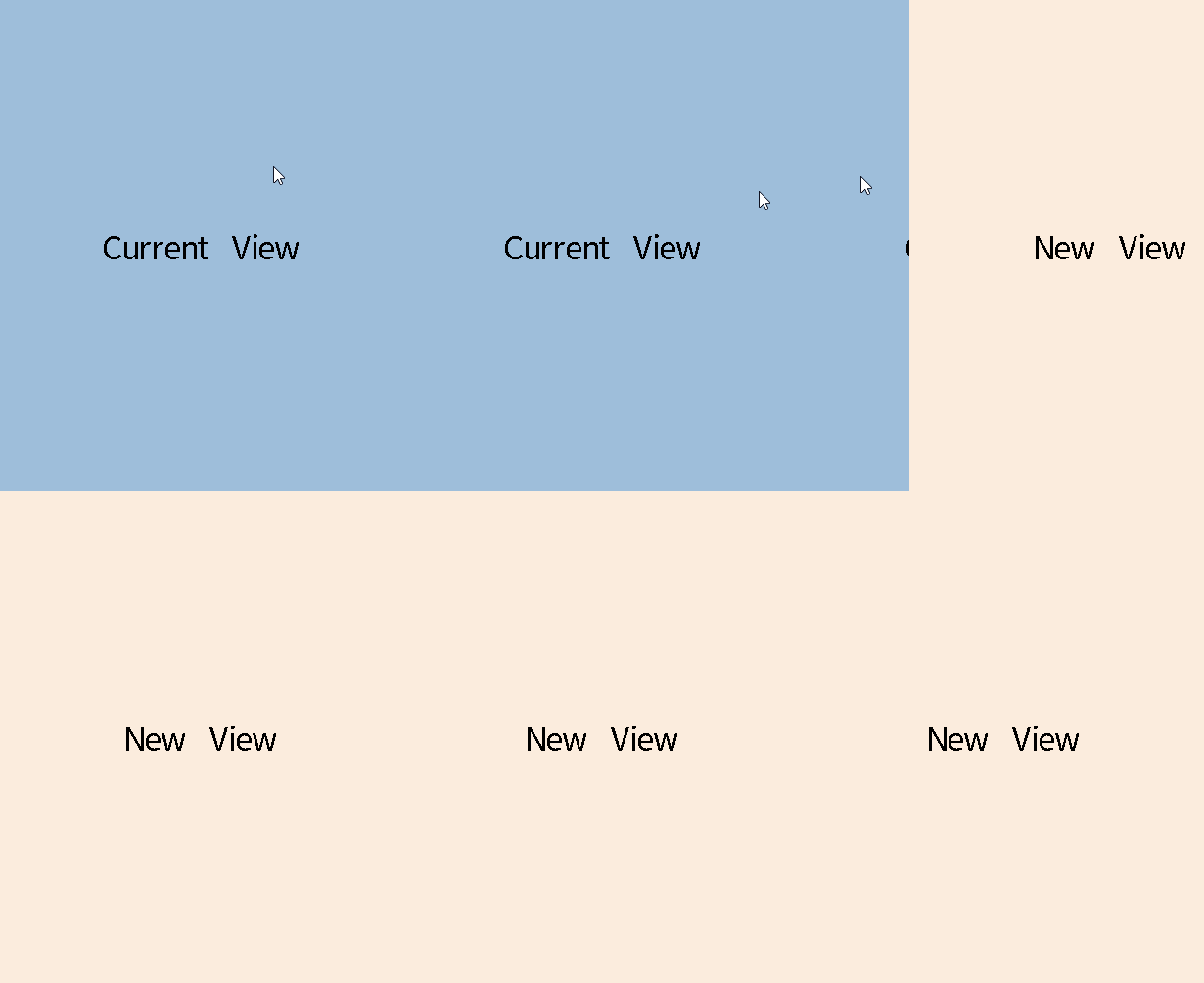
View Switching Diagram
Usage
Register Descriptor of View
The gui_view_descriptor_register() function can be used to register descriptor of view in the descriptor list for other view to read and use as a parameter to create the view, via passing in the descriptor's address. The gui_view_descriptor structure is defined as follows:
typedef struct gui_view_descriptor
{
    const char *name;
    gui_view_t **pView;

    void (* on_switch_in)(gui_view_t *view);  // Callback function when view is switched in and created.
    void (* on_switch_out)(gui_view_t
                           *view); // Callback function when view is switched out and destroyed.

uint8_t keep       :
    1; // If keep is true, the view will not be destroyed when switch to other view and will be created when register view
} gui_view_descriptor_t;
Get Descriptor of View by Name
The gui_view_descriptor_get() function can be used to get the view descriptor with the corresponding name by passing in the string.
Create View Widget
The gui_view_create() function can be used to establish a view widget.
Set Switch View Event
The gui_view_switch_on_event() function can be used to set switch view event. Repeatable settings for a particular event will use the latest descriptor. Specific events include GUI_EVENT_TOUCH_CLICKED, GUI_EVENT_KB_SHORT_PRESSED, GUI_EVENT_TOUCH_MOVE_LEFT, GUI_EVENT_TOUCH_MOVE_RIGHT and so on. The available switching styles include the following:
typedef enum
{
    SWITCH_INIT_STATE = 0x0000, ///< Default status.
    SWITCH_IN_STILL_USE_BLUR,   ///< Switch in still with gauss blur.
    SWITCH_OUT_STILL_USE_BLUR,  ///< Switch out still with gauss blur.

    SWITCH_OUT_TO_LEFT_USE_TRANSLATION = 0x0100, ///< Switch out to left with transition effect.
    SWITCH_OUT_TO_RIGHT_USE_TRANSLATION, ///< Switch out to right with transition effect.
    SWITCH_OUT_TO_TOP_USE_TRANSLATION, ///< Switch out to top with transition effect.
    SWITCH_OUT_TO_BOTTOM_USE_TRANSLATION, ///< Switch out to bottom with transition effect.

    SWITCH_IN_FROM_LEFT_USE_TRANSLATION, ///< Switch in from left with transition effect.
    SWITCH_IN_FROM_RIGHT_USE_TRANSLATION, ///< Switch in from right with transition effect.
    SWITCH_IN_FROM_TOP_USE_TRANSLATION, ///< Switch in from top with transition effect.
    SWITCH_IN_FROM_BOTTOM_USE_TRANSLATION, ///< Switch in from bottom with transition effect.

    SWITCH_IN_FROM_LEFT_USE_CUBE = 0x0200, ///< Switch in from left with cube effect.
    SWITCH_IN_FROM_RIGHT_USE_CUBE, ///< Switch in from right with cube effect.
    SWITCH_IN_FROM_TOP_USE_CUBE, ///< Switch in from top with cube effect.
    SWITCH_IN_FROM_BOTTOM_USE_CUBE, ///< Switch in from bottom with cube effect.

    SWITCH_OUT_TO_LEFT_USE_CUBE, ///< Switch out to left with cube effect.
    SWITCH_OUT_TO_RIGHT_USE_CUBE, ///< Switch out to right with cube effect.
    SWITCH_OUT_TO_TOP_USE_CUBE, ///< Switch out to top with cube effect.
    SWITCH_OUT_TO_BOTTOM_USE_CUBE, ///< Switch out to bottom with cube effect.

    SWITCH_IN_FROM_LEFT_USE_ROTATE = 0x0300, ///< Switch in from left with rotate effect.
    SWITCH_IN_FROM_RIGHT_USE_ROTATE, ///< Switch in from right with rotate effect.
    SWITCH_IN_FROM_TOP_USE_ROTATE, ///< Switch in from top with rotate effect.
    SWITCH_IN_FROM_BOTTOM_USE_ROTATE, ///< Switch in from bottom with rotate effect.

    SWITCH_OUT_TO_LEFT_USE_ROTATE, ///< Switch out to left with rotate effect.
    SWITCH_OUT_TO_RIGHT_USE_ROTATE, ///< Switch out to right with rotate effect.
    SWITCH_OUT_TO_TOP_USE_ROTATE, ///< Switch out to top with rotate effect.
    SWITCH_OUT_TO_BOTTOM_USE_ROTATE, ///< Switch out to bottom with rotate effect.

    SWITCH_IN_FROM_LEFT_USE_REDUCTION = 0x0400, ///< Switch in from left with reduction effect.
    SWITCH_IN_FROM_RIGHT_USE_REDUCTION, ///< Switch in from right with reduction effect.
    SWITCH_IN_FROM_TOP_USE_REDUCTION, ///< Switch in from top with reduction effect.
    SWITCH_IN_FROM_BOTTOM_USE_REDUCTION, ///< Switch in from bottom with reduction effect.

    SWITCH_OUT_TO_LEFT_USE_REDUCTION, ///< Switch out to left with reduction effect.
    SWITCH_OUT_TO_RIGHT_USE_REDUCTION, ///< Switch out to right with reduction effect.
    SWITCH_OUT_TO_TOP_USE_REDUCTION, ///< Switch out to top with reduction effect.
    SWITCH_OUT_TO_BOTTOM_USE_REDUCTION, ///< Switch out to bottom with reduction effect.

    SWITCH_OUT_NONE_ANIMATION = 0x0500, ///< No animation.
    SWITCH_OUT_ANIMATION_ZOOM,
    SWITCH_OUT_ANIMATION_FADE,
    SWITCH_OUT_ANIMATION_MOVE_TO_RIGHT,
    SWITCH_OUT_ANIMATION_MOVE_TO_LEFT,
    SWITCH_OUT_ANIMATION_ZOOM_TO_TOP_LEFT,       // scale to top left
    SWITCH_OUT_ANIMATION_ZOOM_TO_TOP_RIGHT,      // scale to top right
    SWITCH_IN_ANIMATION_ZOOM_FROM_TOP_LEFT,      // scale from top left
    SWITCH_IN_ANIMATION_ZOOM_FROM_TOP_RIGHT,     // scale from top right
    SWITCH_IN_NONE_ANIMATION,           ///< No animation.
    SWITCH_IN_ANIMATION_ZOOM,
    SWITCH_IN_ANIMATION_FADE,
    SWITCH_IN_ANIMATION_MOVE_FADE,
    SWITCH_IN_ANIMATION_MOVE_FROM_RIGHT,
    SWITCH_IN_ANIMATION_MOVE_FROM_LEFT,
    SWITCH_IN_ANIMATION_BOUNCE_FROM_RIGHT,


} VIEW_SWITCH_STYLE;
Switch View Directly
The gui_view_switch_direct() function can be used to switch view directly, which can be used in conjunction with events or animations of the child widgets based on view. Note that the switching style is limited to the animation style and cannot be set to the sliding style.
Set Animation Step Length
The gui_view_set_animate_step() function can be used to set switching animation step length.
Set Opacity
The gui_view_set_opacity() function can be used to set opacity of widget, then the overlapping display effect of view can be achieved.
Get Current View Pointer
The gui_view_get_current() function can be used to get current view pointer, and can be used with gui_view_switch_direct() to switch the current view.
Get Next View Pointer
The gui_view_get_next() function can be used to get next view pointer during switching.
Example
View
Below are four separate C files, each containing a descriptor for the view and the design function.
#include "guidef.h"
#include "gui_img.h"
#include "gui_obj.h"
#include "string.h"
#include "stdio.h"
#include "stdlib.h"
#include "../../assets/tiger_blue.txt"
#include "gui_server.h"
#include "gui_components_init.h"
#include "gui_win.h"
#include "gui_view.h"
#include "gui_view_instance.h"

#define CURRENT_VIEW_NAME "blue_view"


static void switch_in_cb(gui_view_t *view);
static void switch_out_cb(gui_view_t *view);

GUI_VIEW_INSTANCE(CURRENT_VIEW_NAME, true, switch_in_cb, switch_out_cb);

static void img_cb(void *obj, gui_event_t *e)
{
    GUI_UNUSED(obj);
    GUI_UNUSED(e);

    gui_view_switch_direct(gui_view_get("blue_view"), "white_view",
                           SWITCH_OUT_NONE_ANIMATION,
                           SWITCH_IN_NONE_ANIMATION);
}

static void switch_out_cb(gui_view_t *view)
{
    GUI_UNUSED(view);
    gui_log("blue view clean\n");
}

static void switch_in_cb(gui_view_t *view)
{
    gui_view_set_animate_step(view, 20);
    gui_img_t *img = gui_img_create_from_mem(view, "img", (void *)_actiger_blue, 200, 200, 0, 0);
    gui_obj_add_event_cb(img, (gui_event_cb_t)img_cb, GUI_EVENT_TOUCH_CLICKED, NULL);

    gui_view_switch_on_event(view, "yellow_view", SWITCH_OUT_TO_RIGHT_USE_CUBE,
                             SWITCH_IN_FROM_LEFT_USE_CUBE,
                             GUI_EVENT_TOUCH_MOVE_RIGHT);

    gui_view_switch_on_event(view, "white_view", SWITCH_OUT_TO_LEFT_USE_CUBE,
                             SWITCH_IN_FROM_RIGHT_USE_CUBE,
                             GUI_EVENT_TOUCH_MOVE_LEFT);

    gui_view_switch_on_event(view, "yellow_view",
                             SWITCH_OUT_TO_TOP_USE_TRANSLATION,
                             SWITCH_IN_FROM_BOTTOM_USE_TRANSLATION,
                             GUI_EVENT_TOUCH_MOVE_UP);

    gui_view_switch_on_event(view, "lime_view", SWITCH_OUT_STILL_USE_BLUR,
                             SWITCH_IN_FROM_TOP_USE_TRANSLATION,
                             GUI_EVENT_TOUCH_MOVE_DOWN);

    gui_view_switch_on_event(view, "white_view", SWITCH_OUT_ANIMATION_ZOOM,
                             SWITCH_IN_ANIMATION_ZOOM,
                             GUI_EVENT_TOUCH_CLICKED);


}


static int app_init(void)
{
    gui_view_create(gui_obj_get_root(), CURRENT_VIEW_NAME, 0, 0, 0, 0);
    return 0;
}

GUI_INIT_APP_EXPORT(app_init);
#include "guidef.h"
#include "gui_img.h"
#include "gui_obj.h"
#include "string.h"
#include "stdio.h"
#include "stdlib.h"
#include "../../assets/tiger_white.txt"
#include "gui_server.h"
#include "gui_components_init.h"
#include "gui_view.h"
#include "gui_view_instance.h"

#define CURRENT_VIEW_NAME "white_view"


static void app_ui_view_white_design(gui_view_t *view);

GUI_VIEW_INSTANCE(CURRENT_VIEW_NAME, false, app_ui_view_white_design, NULL);

static void img_cb(void *obj, gui_event_t *e)
{
    GUI_UNUSED(obj);
    GUI_UNUSED(e);

    gui_view_switch_direct(gui_view_get("white_view"), "blue_view",
                           SWITCH_OUT_NONE_ANIMATION,
                           SWITCH_IN_NONE_ANIMATION);
}

static void app_ui_view_white_design(gui_view_t *view)
{
    gui_view_set_animate_step(view, 20);
    gui_img_t *img = gui_img_create_from_mem(view, "img", (void *)_actiger_white, 0, 0, 0,
                                             0);

    gui_obj_add_event_cb(img, (gui_event_cb_t)img_cb, GUI_EVENT_TOUCH_CLICKED, NULL);

    gui_view_switch_on_event(view, "blue_view", SWITCH_OUT_TO_RIGHT_USE_CUBE,
                             SWITCH_IN_FROM_LEFT_USE_CUBE,
                             GUI_EVENT_TOUCH_MOVE_RIGHT);

    gui_view_switch_on_event(view, "yellow_view",
                             SWITCH_OUT_TO_LEFT_USE_ROTATE,
                             SWITCH_IN_FROM_RIGHT_USE_ROTATE,
                             GUI_EVENT_TOUCH_MOVE_LEFT);

    gui_view_switch_on_event(view, "blue_view",
                             SWITCH_OUT_TO_TOP_USE_TRANSLATION,
                             SWITCH_IN_FROM_BOTTOM_USE_TRANSLATION,
                             GUI_EVENT_TOUCH_MOVE_UP);

    gui_view_switch_on_event(view, "yellow_view",
                             SWITCH_OUT_TO_BOTTOM_USE_TRANSLATION,
                             SWITCH_IN_FROM_TOP_USE_TRANSLATION,
                             GUI_EVENT_TOUCH_MOVE_DOWN);

    gui_view_switch_on_event(view, "yellow_view", SWITCH_OUT_ANIMATION_ZOOM,
                             SWITCH_IN_ANIMATION_ZOOM,
                             GUI_EVENT_TOUCH_CLICKED);

    gui_view_set_animate_step(view, 30);

}
#include "guidef.h"
#include "gui_img.h"
#include "gui_obj.h"
#include "string.h"
#include "stdio.h"
#include "stdlib.h"
#include "../../assets/tiger_yellow.txt"
#include "gui_server.h"
#include "gui_components_init.h"
#include "gui_view.h"
#include "gui_view_instance.h"

#define CURRENT_VIEW_NAME "yellow_view"

static void app_ui_view_yellow_design(gui_view_t *view);

GUI_VIEW_INSTANCE(CURRENT_VIEW_NAME, false, app_ui_view_yellow_design, NULL);

static void app_ui_view_yellow_design(gui_view_t *view)
{
    gui_view_set_animate_step(view, 20);
    gui_img_create_from_mem(view, "img", (void *)_actiger_yellow, 0, 0, 0,
                            0);

    gui_view_switch_on_event(view, "white_view",
                             SWITCH_OUT_TO_RIGHT_USE_ROTATE,
                             SWITCH_IN_FROM_LEFT_USE_ROTATE,
                             GUI_EVENT_TOUCH_MOVE_RIGHT);

    gui_view_switch_on_event(view, "blue_view", SWITCH_OUT_TO_LEFT_USE_CUBE,
                             SWITCH_IN_FROM_RIGHT_USE_CUBE,
                             GUI_EVENT_TOUCH_MOVE_LEFT);

    gui_view_switch_on_event(view, "white_view",
                             SWITCH_OUT_TO_TOP_USE_TRANSLATION,
                             SWITCH_IN_FROM_BOTTOM_USE_TRANSLATION,
                             GUI_EVENT_TOUCH_MOVE_UP);

    gui_view_switch_on_event(view, "blue_view",
                             SWITCH_OUT_TO_BOTTOM_USE_TRANSLATION,
                             SWITCH_IN_FROM_TOP_USE_TRANSLATION,
                             GUI_EVENT_TOUCH_MOVE_DOWN);

    gui_view_switch_on_event(view, "blue_view", SWITCH_OUT_ANIMATION_FADE,
                             SWITCH_IN_ANIMATION_BOUNCE_FROM_RIGHT,
                             GUI_EVENT_TOUCH_CLICKED);

}
#include "guidef.h"
#include "gui_img.h"
#include "gui_obj.h"
#include "string.h"
#include "stdio.h"
#include "stdlib.h"
#include "../../assets/tiger_lime.txt"
#include "gui_server.h"
#include "gui_components_init.h"
#include "gui_view.h"
#include "gui_view_instance.h"

#define CURRENT_VIEW_NAME "lime_view"


static void app_ui_view_lime_design(gui_view_t *view);

GUI_VIEW_INSTANCE(CURRENT_VIEW_NAME, false, app_ui_view_lime_design, NULL);

static void img_cb(void *obj, gui_event_t *e)
{
    GUI_UNUSED(obj);
    GUI_UNUSED(e);

    gui_view_switch_direct(gui_view_get("lime_view"), "blue_view",
                           SWITCH_OUT_ANIMATION_ZOOM,
                           SWITCH_IN_ANIMATION_ZOOM);
}

static void app_ui_view_lime_design(gui_view_t *view)
{
    gui_view_set_animate_step(view, 20);
    gui_img_t *img = gui_img_create_from_mem(view, "img", (void *)_actiger_lime, 200, 100, 0,
                                             0);

    gui_obj_add_event_cb(img, (gui_event_cb_t)img_cb, GUI_EVENT_TOUCH_CLICKED, NULL);

    gui_view_switch_on_event(view, "blue_view",
                             SWITCH_OUT_TO_TOP_USE_TRANSLATION,
                             SWITCH_IN_STILL_USE_BLUR,
                             GUI_EVENT_TOUCH_MOVE_UP);

    gui_view_set_opacity(view, 150);


}

View Example
API
Defines
-
EVENT_NUM_MAX 15
Enums
-
enum VIEW_SWITCH_STYLE
-
Values:
-
enumerator SWITCH_INIT_STATE
-
Default status.
-
enumerator SWITCH_IN_STILL_USE_BLUR
-
Switch in still with gauss blur.
-
enumerator SWITCH_OUT_STILL_USE_BLUR
-
Switch out still with gauss blur.
-
enumerator SWITCH_OUT_TO_LEFT_USE_TRANSLATION
-
Switch out to left with transition effect.
-
enumerator SWITCH_OUT_TO_RIGHT_USE_TRANSLATION
-
Switch out to right with transition effect.
-
enumerator SWITCH_OUT_TO_TOP_USE_TRANSLATION
-
Switch out to top with transition effect.
-
enumerator SWITCH_OUT_TO_BOTTOM_USE_TRANSLATION
-
Switch out to bottom with transition effect.
-
enumerator SWITCH_IN_FROM_LEFT_USE_TRANSLATION
-
Switch in from left with transition effect.
-
enumerator SWITCH_IN_FROM_RIGHT_USE_TRANSLATION
-
Switch in from right with transition effect.
-
enumerator SWITCH_IN_FROM_TOP_USE_TRANSLATION
-
Switch in from top with transition effect.
-
enumerator SWITCH_IN_FROM_BOTTOM_USE_TRANSLATION
-
Switch in from bottom with transition effect.
-
enumerator SWITCH_IN_FROM_LEFT_USE_CUBE
-
Switch in from left with cube effect.
-
enumerator SWITCH_IN_FROM_RIGHT_USE_CUBE
-
Switch in from right with cube effect.
-
enumerator SWITCH_IN_FROM_TOP_USE_CUBE
-
Switch in from top with cube effect.
-
enumerator SWITCH_IN_FROM_BOTTOM_USE_CUBE
-
Switch in from bottom with cube effect.
-
enumerator SWITCH_OUT_TO_LEFT_USE_CUBE
-
Switch out to left with cube effect.
-
enumerator SWITCH_OUT_TO_RIGHT_USE_CUBE
-
Switch out to right with cube effect.
-
enumerator SWITCH_OUT_TO_TOP_USE_CUBE
-
Switch out to top with cube effect.
-
enumerator SWITCH_OUT_TO_BOTTOM_USE_CUBE
-
Switch out to bottom with cube effect.
-
enumerator SWITCH_IN_FROM_LEFT_USE_ROTATE
-
Switch in from left with rotate effect.
-
enumerator SWITCH_IN_FROM_RIGHT_USE_ROTATE
-
Switch in from right with rotate effect.
-
enumerator SWITCH_IN_FROM_TOP_USE_ROTATE
-
Switch in from top with rotate effect.
-
enumerator SWITCH_IN_FROM_BOTTOM_USE_ROTATE
-
Switch in from bottom with rotate effect.
-
enumerator SWITCH_OUT_TO_LEFT_USE_ROTATE
-
Switch out to left with rotate effect.
-
enumerator SWITCH_OUT_TO_RIGHT_USE_ROTATE
-
Switch out to right with rotate effect.
-
enumerator SWITCH_OUT_TO_TOP_USE_ROTATE
-
Switch out to top with rotate effect.
-
enumerator SWITCH_OUT_TO_BOTTOM_USE_ROTATE
-
Switch out to bottom with rotate effect.
-
enumerator SWITCH_IN_FROM_LEFT_USE_REDUCTION
-
Switch in from left with reduction effect.
-
enumerator SWITCH_IN_FROM_RIGHT_USE_REDUCTION
-
Switch in from right with reduction effect.
-
enumerator SWITCH_IN_FROM_TOP_USE_REDUCTION
-
Switch in from top with reduction effect.
-
enumerator SWITCH_IN_FROM_BOTTOM_USE_REDUCTION
-
Switch in from bottom with reduction effect.
-
enumerator SWITCH_OUT_TO_LEFT_USE_REDUCTION
-
Switch out to left with reduction effect.
-
enumerator SWITCH_OUT_TO_RIGHT_USE_REDUCTION
-
Switch out to right with reduction effect.
-
enumerator SWITCH_OUT_TO_TOP_USE_REDUCTION
-
Switch out to top with reduction effect.
-
enumerator SWITCH_OUT_TO_BOTTOM_USE_REDUCTION
-
Switch out to bottom with reduction effect.
-
enumerator SWITCH_OUT_NONE_ANIMATION
-
No animation.
-
enumerator SWITCH_OUT_ANIMATION_ZOOM
-
enumerator SWITCH_OUT_ANIMATION_FADE
-
enumerator SWITCH_OUT_ANIMATION_MOVE_TO_RIGHT
-
enumerator SWITCH_OUT_ANIMATION_MOVE_TO_LEFT
-
enumerator SWITCH_OUT_ANIMATION_ZOOM_TO_TOP_LEFT
-
enumerator SWITCH_OUT_ANIMATION_ZOOM_TO_TOP_RIGHT
-
enumerator SWITCH_IN_ANIMATION_ZOOM_FROM_TOP_LEFT
-
enumerator SWITCH_IN_ANIMATION_ZOOM_FROM_TOP_RIGHT
-
enumerator SWITCH_IN_NONE_ANIMATION
-
No animation.
-
enumerator SWITCH_IN_ANIMATION_ZOOM
-
enumerator SWITCH_IN_ANIMATION_FADE
-
enumerator SWITCH_IN_ANIMATION_MOVE_FADE
-
enumerator SWITCH_IN_ANIMATION_MOVE_FROM_RIGHT
-
enumerator SWITCH_IN_ANIMATION_MOVE_FROM_LEFT
-
enumerator SWITCH_IN_ANIMATION_BOUNCE_FROM_RIGHT
-
enumerator SWITCH_INIT_STATE
Functions
-
gui_view_t *gui_view_create(void *parent, const char *name, int16_t x, int16_t y, int16_t w, int16_t h)
-
Create a view widget.
- Parameters:
parent -- Father widget it nested in.
name -- View name that can be used to find the target view descriptor.
x -- X-axis coordinate relative to parent widget.
y -- Y-axis coordinate relative to parent widget.
w -- Width.
h -- Height.
- Returns:
-
Widget object pointer.
-
void gui_view_descriptor_register(const gui_view_descriptor_t *descriptor)
-
Register view's descriptor.
- Parameters:
-
descriptor -- Pointer to a descriptor that defines the new view to switch to.
-
const gui_view_descriptor_t *gui_view_descriptor_get(const char *name)
-
Get target view's descriptor by name.
- Parameters:
-
name -- View descriptor's name that can be used to find the target view.
- Returns:
-
Pointer to the view descriptor.
-
gui_view_t *gui_view_get(const char *name)
-
Get target view by name.
- Parameters:
-
name -- View descriptor's name that can be used to find the target view.
- Returns:
-
Pointer to the view.
-
void gui_view_switch_on_event(gui_view_t *_this, const char *target_view_name, VIEW_SWITCH_STYLE switch_out_style, VIEW_SWITCH_STYLE switch_in_style, gui_event_code_t event)
-
Switches the current GUI view to a new view based on the specified event.
This function handles the transition between GUI views. It takes the current view context and switches it to a new view as described by the target view name. The transition is triggered by a specified event and can be customized with different switch styles for the outgoing and incoming views.
- Parameters:
_this -- Pointer to the current GUI view context that is being manipulated.
target_view_name -- Target view name that can be used to find the target view descriptor.
switch_out_style -- Style applied to the outgoing view during the switch.
switch_in_style -- Style applied to the incoming view during the switch.
event -- Event that triggers the view switch.
-
void gui_view_switch_direct(gui_view_t *_this, const char *target_view_name, VIEW_SWITCH_STYLE switch_out_style, VIEW_SWITCH_STYLE switch_in_style)
-
Switches directly the current GUI view to a new view through animation.
This function handles the transition between GUI views. It takes the current view context and switches it to a new view as described by the target view name. The transition animation can be customized with different animation switch styles for the outgoing and incoming views.
- Parameters:
_this -- Pointer to the current GUI view context that is being manipulated.
target_view_name -- Target view name that can be used to find the target view descriptor.
switch_out_style -- Style applied to the outgoing view during the switch.
switch_in_style -- Style applied to the incoming view during the switch.
-
void gui_view_set_animate_step(gui_view_t *_this, uint16_t step)
-
Set view animate step.
- Parameters:
_this -- Pointer to view.
step -- Animate step, the larger the value, the faster the animation speed.
-
void gui_view_set_opacity(gui_view_t *_this, uint8_t opacity)
-
Set view opacity.
- Parameters:
_this -- Pointer to view.
opacity -- 0 is totally transparent, 255 is opaque.
-
gui_view_t *gui_view_get_current(void)
-
Get current view pointer.
- Returns:
-
Current view pointer.
-
gui_view_t *gui_view_get_next(void)
-
Get next view pointer.
- Returns:
-
Next view pointer.
-
struct gui_view_t
-
struct gui_view_descriptor_t
-
Public Members
-
const char *name
-
gui_view_t **pView
-
void (*on_switch_in)(gui_view_t *view)
-
void (*on_switch_out)(gui_view_t *view)
-
uint8_t keep
-
const char *name
-
struct gui_view_on_event_t
-
Public Members
-
const gui_view_descriptor_t *descriptor
-
VIEW_SWITCH_STYLE switch_out_style
-
VIEW_SWITCH_STYLE switch_in_style
-
gui_event_code_t event_code
-
const gui_view_descriptor_t *descriptor