Event System
The HoneyGUI Visual Designer event system adopts the Event-Action pattern, allowing users to configure event responses for components in the designer without writing code to implement common interaction logic.
Core Concepts
Event
Interactive behavior triggered by components.
Action
Operations executed after an event is triggered. An event can be configured with multiple actions that execute in sequence.
Message
A global broadcast mechanism where components can send messages and other components can listen and respond.
UI Design Changes
Unified Property Panel Tabs
The original view switch functionality has been unified into the Event-Action system:
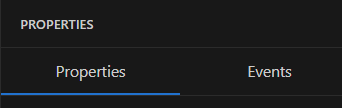
Properties Panel
Properties: Basic component attributes (position, size, style, etc.)
Events: Event-Action configuration (includes original view switch functionality)
Event Types
Common Events (Supported by All Components)
Event Name |
Identifier |
Description |
|---|---|---|
Click |
|
Triggered when released after clicking |
Long Press |
|
Triggered when held beyond threshold time |
Touch Down |
|
Triggered when finger touches down |
Touch Up |
|
Triggered when finger lifts up |
Swipe Events (Supported by Container Components)
Event Name |
Identifier |
Description |
Supported Components |
|---|---|---|---|
Swipe Left |
|
Triggered by left swipe |
hg_view, hg_window |
Swipe Right |
|
Triggered by right swipe |
hg_view, hg_window |
Swipe Up |
|
Triggered by upward swipe |
hg_view, hg_window |
Swipe Down |
|
Triggered by downward swipe |
hg_view, hg_window |
State Events (Supported by Specific Components)
Event Name |
Identifier |
Description |
Supported Components |
|---|---|---|---|
Value Change |
|
Triggered when value changes |
hg_slider, hg_progressbar, hg_input |
Checked Change |
|
Checked state change |
hg_checkbox, hg_switch, hg_radio |
Lifecycle Events (Supported by Container Components)
Event Name |
Identifier |
Description |
Supported Components |
|---|---|---|---|
Show |
|
Triggered when component is shown |
hg_view, hg_window |
Hide |
|
Triggered when component is hidden |
hg_view, hg_window |
Message Events (Supported by All Components)
Event Name |
Identifier |
Description |
|---|---|---|
Message Listener |
|
Triggered when specified message is received |
Component Supported Events
Component Type |
Supported Events |
|---|---|
hg_view |
onClick, onLongPress, onTouchDown, onTouchUp, onSwipeLeft, onSwipeRight, onSwipeUp, onSwipeDown, onShow, onHide, onMessage |
hg_window |
onClick, onLongPress, onTouchDown, onTouchUp, onSwipeLeft, onSwipeRight, onSwipeUp, onSwipeDown, onShow, onHide, onMessage |
hg_button |
onClick, onLongPress, onTouchDown, onTouchUp, onMessage |
hg_image |
onClick, onLongPress, onTouchDown, onTouchUp, onMessage |
hg_label |
onClick, onLongPress, onMessage |
hg_switch |
onClick, onCheckedChange, onMessage |
hg_checkbox |
onClick, onCheckedChange, onMessage |
hg_radio |
onClick, onCheckedChange, onMessage |
hg_slider |
onClick, onValueChange, onMessage |
hg_progressbar |
onClick, onValueChange, onMessage |
hg_input |
onClick, onValueChange, onMessage |
hg_video |
onClick, onLongPress, onMessage |
hg_3d |
onClick, onLongPress, onMessage |
Action Types
View Switch Actions
Action Name |
Identifier |
Parameters |
Description |
|---|---|---|---|
Switch View |
|
target, switchOutStyle, switchInStyle |
View switch with animation |
switchOutStyle Options:
Translation:
SWITCH_OUT_TO_LEFT/RIGHT/TOP/BOTTOM_USE_TRANSLATIONCube:
SWITCH_OUT_TO_LEFT/RIGHT/TOP/BOTTOM_USE_CUBEOthers:
SWITCH_OUT_NONE_ANIMATION,SWITCH_OUT_ANIMATION_FADE
switchInStyle Options:
Translation:
SWITCH_IN_FROM_LEFT/RIGHT/TOP/BOTTOM_USE_TRANSLATIONCube:
SWITCH_IN_FROM_LEFT/RIGHT/TOP/BOTTOM_USE_CUBEOthers:
SWITCH_IN_NONE_ANIMATION,SWITCH_IN_ANIMATION_FADE
Message Actions
Action Name |
Identifier |
Parameters |
Description |
|---|---|---|---|
Send Message |
|
message |
Broadcast message |
Custom Actions
Action Name |
Identifier |
Parameters |
Description |
|---|---|---|---|
Call Function |
|
functionName |
Call user-defined C function |
Message System
Concept
The message system provides a decoupled communication mechanism between components:
Sender: Broadcasts messages through
sendMessageactionReceiver: Listens for messages through
onMessageevent
Use Cases
Cross-view Communication: Operations in view A affect display in view B
Global State Sync: Multiple components respond to the same state change
Module Decoupling: Avoid direct references between components
Data Structures
Event Configuration in HML
Button Click to Jump:
<hg_button id="btn1" x="10" y="10" w="100" h="40" text="Click">
  <events>
    <event type="onClick">
      <action type="switchView" target="screen2" />
    </event>
  </events>
</hg_button>
View Swipe Switch (original view_switch functionality):
<hg_view id="main_view" x="0" y="0" w="480" h="272">
  <events>
    <event type="onSwipeLeft">
      <action type="switchView" target="screen2"
              switchOutStyle="SWITCH_OUT_TO_LEFT_USE_TRANSLATION"
              switchInStyle="SWITCH_IN_FROM_RIGHT_USE_TRANSLATION" />
    </event>
  </events>
</hg_view>
TypeScript Type Definitions
// Event types
type EventType =
  // Common events
  | 'onClick' | 'onLongPress' | 'onTouchDown' | 'onTouchUp'
  // Swipe events
  | 'onSwipeLeft' | 'onSwipeRight' | 'onSwipeUp' | 'onSwipeDown'
  // State events
  | 'onValueChange' | 'onCheckedChange'
  // Lifecycle events
  | 'onShow' | 'onHide'
  // Message events
  | 'onMessage';

// Action types
type ActionType =
  // View switch (with animation)
  | 'switchView'
  // Message
  | 'sendMessage'
  // Custom
  | 'callFunction';

// Action definition
interface Action {
  type: ActionType;
  target?: string;           // Target component/view ID
  message?: string;          // Message name (for sendMessage)
  functionName?: string;     // Function name (for callFunction)
  // switchView specific
  switchOutStyle?: string;   // Exit animation
  switchInStyle?: string;    // Enter animation
}

// Event definition
interface EventConfig {
  type: EventType;
  message?: string;          // Only needed for onMessage event
  actions: Action[];
}
C Code Generation Implementation
View Switch (switchView)
No independent callback function is generated; instead, registration is done directly in the switch_in callback of the GUI_VIEW_INSTANCE macro using gui_view_switch_on_event:
static void main_view_switch_in(gui_view_t *view)
{
    // Register left swipe event
    gui_view_switch_on_event(view, "screen2",
                             SWITCH_OUT_TO_LEFT_USE_TRANSLATION,
                             SWITCH_IN_FROM_RIGHT_USE_TRANSLATION,
                             GUI_EVENT_TOUCH_MOVE_LEFT);

    // Create child components...
}

GUI_VIEW_INSTANCE("main_view", false, main_view_switch_in, main_view_switch_out);
Other Events
Callback functions are generated and bound when components are created:
// ui/main_ui.c
gui_obj_add_event_cb(btn1, on_btn1_click, GUI_EVENT_CLICKED, NULL);

// callbacks/main_callbacks.c
/* @protected start on_btn1_click */
void on_btn1_click(gui_obj_t *obj) {
    // User implementation logic
}
/* @protected end on_btn1_click */
UI Design
Property Panel - Events Tab
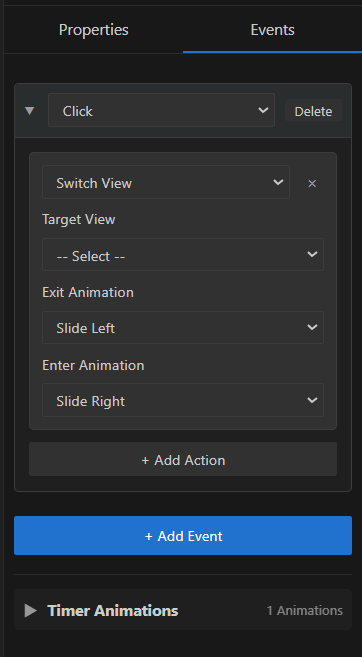
Events Panel
Practical Examples
Example 2: Swipe Left to Switch View
Scenario: Swipe left on main view to enter settings view
HML Configuration:
<hg_view id="main_view" x="0" y="0" w="480" h="272">
  <events>
    <event type="onSwipeLeft">
      <action type="switchView" target="settings"
              switchOutStyle="SWITCH_OUT_TO_LEFT_USE_TRANSLATION"
              switchInStyle="SWITCH_IN_FROM_RIGHT_USE_TRANSLATION" />
    </event>
  </events>
</hg_view>
Generated C Code:
static void main_view_switch_in(gui_view_t *view)
{
    gui_view_switch_on_event(view, "settings",
                             SWITCH_OUT_TO_LEFT_USE_TRANSLATION,
                             SWITCH_IN_FROM_RIGHT_USE_TRANSLATION,
                             GUI_EVENT_TOUCH_MOVE_LEFT);
    // ...
}
Example 3: Message Communication
Scenario: Button sends message, other components listen and respond
Sender HML:
<hg_button id="refresh_btn" x="10" y="10" w="100" h="40" text="Refresh">
  <events>
    <event type="onClick">
      <action type="sendMessage" message="refresh_data" />
    </event>
  </events>
</hg_button>
Receiver HML:
<hg_label id="data_label" x="10" y="60" w="200" h="30" text="Data">
  <events>
    <event type="onMessage" message="refresh_data">
      <action type="callFunction" functionName="on_refresh_data" />
    </event>
  </events>
</hg_label>
Example 4: Custom Function Call
Scenario: Button click executes complex business logic
HML Configuration:
<hg_button id="save_btn" x="10" y="10" w="100" h="40" text="Save">
  <events>
    <event type="onClick">
      <action type="callFunction" functionName="save_settings" />
    </event>
  </events>
</hg_button>
User Implementation:
// callbacks/main_callbacks.c
/* @protected start save_settings */
void save_settings(gui_obj_t *obj) {
    // Read various settings
    bool wifi_enabled = get_wifi_switch_state();
    int brightness = get_brightness_value();

    // Save to flash
    flash_write_config(wifi_enabled, brightness);

    // Show notification
    show_toast("Settings saved");
}
/* @protected end save_settings */
Best Practices
Event Naming Conventions
Use clear function names:
on_save_click,handle_loginInclude event type:
on_button_click,on_slider_changeDescribe business logic:
save_user_settings,refresh_data
Performance Optimization
Avoid time-consuming operations in frequently triggered events
Use message system to decouple complex interactions
Properly use debouncing and throttling
Debugging Tips
Add log output in callback functions
Use breakpoints to verify event flow
Check generated C code to confirm event binding
Next Steps
Learn Code Generation to understand code generation mechanism
See HML File Format to understand HML file format
Refer to Build and Simulation to build and test applications
Read Embedded Deployment for embedded deployment solutions