Font Convert Tool
Note
This chapter introduces the standalone font conversion tool (exe program), which needs to be downloaded and run separately.
Font conversion tool functionality: Obtain all characters to be converted and their corresponding Unicode codes from a standard internal code page file, custom Unicode code page (or supplementary code page .txt file, custom .cst file). Find the corresponding character's vector font data from the font file (such as .ttf) based on the Unicode encoding. Convert it into bitmap format fonts or pre-processed vector fonts, and output as a .bin file.
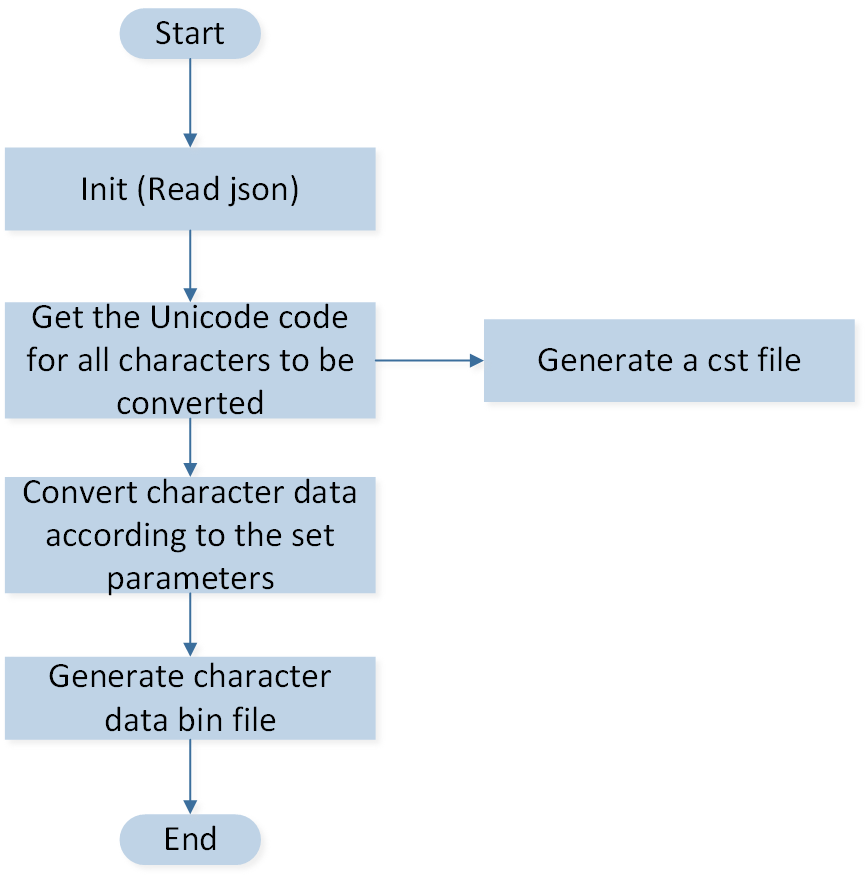
Font Convert Tool Flowchart
Font Bin Generation
Please refer to the following steps for how to generate files:
Copy the Font library file to the directory
\FontConvertTool\font.
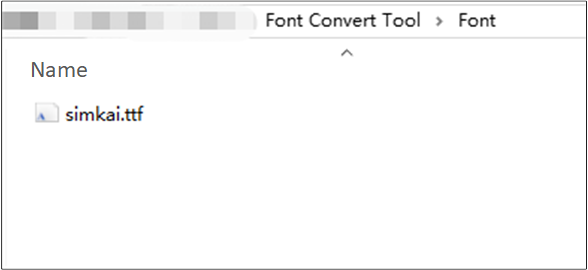
Copy Font Library File
Please refer to the documentation under the directory
\FontConvertTool\docfor the specific meanings of each parameter to configure font parameters by editing FontConfig.json.

Edit FontConfig.json File
Please open setting.ini and modify the optional configuration items.
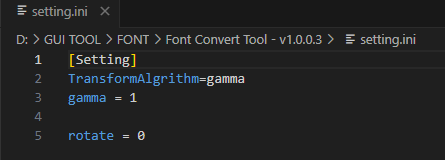
Edit Setting.ini File
Double-click or execute via command line fontDirctionary.exe to generate font.bin.
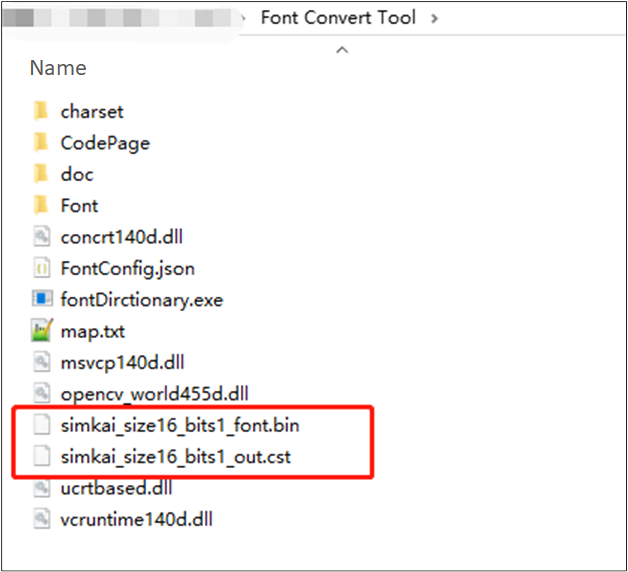
Generate Font.bin File
FontConfig.json Parameter Description
Field name |
Field meaning |
|---|---|
OutputFolder |
Tool output path. If the path does not exist, it will be created directly. |
codePages |
A list of selected characters arranged in a specific order for the text of a language. Multiple sets can be configured. |
cstPaths |
Binary Unicode code point CST file path. Multiple paths can be set. Commonly uses standard range set representation. |
customerVals |
User-defined continuous Unicode characters. Multiple groups can be set. |
firstVal |
The starting value of a custom continuous Unicode character. |
range |
A custom number of consecutive Unicode characters. |
symbolPaths |
Character set file path. Supports direct character reading and hexadecimal Unicode encoding formats. Multiple groups. |
fontSet |
Used to specify font-related settings to be converted. |
bold |
Specifies whether converted characters are bolded. |
italic |
Specifies whether the converted characters are slanted. |
fontSize |
Specifies the converted character size. |
font |
Specifies the font file to use for the conversion. Supports relative paths and automatic file name retrieval. |
renderMode |
Specifies how many bits are used to represent a pixel in the converted character bitmap. Supports 1/2/4/8. |
indexMethod |
Specifies the index mode of the output bin file. 0 for address index, 1 for offset index. |
crop |
Compresses font file size. Always on is recommended. Currently only crop with IndexMethod=0 is supported. |
outputFormat |
Font output format. 0 for bitmap font, 1 for vector font. |
Setting.ini Parameter Description
gamma |
1 |
The gamma value is a parameter used to describe the nonlinear relationship between input pixel values and output brightness. The higher the value, the higher the text brightness. |
rotate |
0 |
Font Rotation Angle. 0: No rotation. 1: Rotate 90° clockwise. 2: Rotate 90° counterclockwise. |
Font Size Evaluation
Different font configurations produce different file sizes, affecting Flash storage space usage. Here are size references for common configurations:
Common Scenario Recommendations
Use Case |
Character Set |
Font Size |
Bit Depth |
Char Count |
Size (KB) |
|---|---|---|---|---|---|
Simple English UI |
ASCII |
24 |
2bpp |
95 |
14.15 |
Western Languages |
ISO8859-1 |
24 |
2bpp |
193 |
28.69 |
Basic Chinese UI |
GB2312 |
24 |
2bpp |
7,478 |
749.03 |
Full Chinese UI |
CP936(GBK) |
24 |
2bpp |
21,886 |
1,717.88 |
Basic Japanese UI |
CP932 |
24 |
2bpp |
7,483 |
746.16 |
Basic Korean UI |
KSX1001 |
24 |
2bpp |
8,187 |
793.48 |
Character Set Comparison
Different character set types contain vastly different numbers of characters, directly affecting file size. Choosing the appropriate character set based on application requirements can effectively balance functionality and storage space.
Character Set Description
Latin
Lite (ASCII): 95 characters, includes basic English letters, numbers and common symbols, suitable for English-only interfaces
Mid (ISO8859-1): 193 characters, includes Western European language characters (French, German, Spanish, etc.), suitable for multi-language European markets
Full (UNICODE): 3,006 characters, includes complete Latin extended character set, suitable for global applications
Chinese
Lite (GB2312): 7,478 characters, includes commonly used Simplified Chinese characters (Level-1: 3,755 + Level-2: 3,008) and symbols, suitable for basic Chinese interfaces
Mid (CP936/GBK): 21,886 characters, includes all GB2312 characters plus Traditional Chinese and rare characters, suitable for complete Chinese support
Full (UNICODE): 30,445 characters, includes CJK Unified Ideographs, suitable for multi-language mixed display
Japanese
Lite (CP932): 7,483 characters, includes Japanese kana, common kanji (JIS Level-1 and Level-2) and symbols, suitable for basic Japanese interfaces
Mid (CP932): 7,483 characters, same as Lite, CP932 already includes common Japanese characters
Full (UNICODE): 16,077 characters, includes complete Japanese character set and extended kanji, suitable for professional Japanese applications
Korean
Lite (KSX1001): 8,187 characters, includes Korean syllables, common hanja and symbols, suitable for basic Korean interfaces
Mid (CP949): 17,106 characters, includes complete Korean syllables (11,172) and extended hanja, suitable for standard Korean applications
Full (UNICODE): 22,862 characters, includes complete Korean character set, suitable for professional Korean applications
Language |
Lite Char Count |
Size(KB) |
Mid Char Count |
Size(KB) |
Full Char Count |
|---|---|---|---|---|---|
Latin |
95 |
14.15 |
193 |
28.69 |
3,006 |
Chinese |
7,478 |
749.03 |
21,886 |
1,717.88 |
30,445 |
Japanese |
7,483 |
746.16 |
7,483 |
746.16 |
16,077 |
Korean |
8,187 |
793.48 |
17,106 |
1,156.32 |
22,862 |
Bit Depth Impact
Bit depth determines font display quality and file size:
1bpp: Black and white display, smallest file size, suitable for simple interfaces
2bpp: 4-level grayscale, smaller file size, good display quality, recommended for general applications (best cost-performance ratio)
4bpp: 16-level grayscale, medium file size, excellent display quality, suitable for high-quality interfaces
8bpp: 256-level grayscale, largest file size, best display quality, suitable for premium products
Bit Depth |
1bpp |
2bpp |
4bpp |
8bpp |
|---|---|---|---|---|
Size(KB) |
501.98 |
749.03 |
1,192.22 |
2,070.20 |
Ratio |
0.67x |
1x |
1.59x |
2.76x |
Font Size Impact
Larger font sizes result in larger file sizes. Theoretically, file size grows quadratically with font size (doubling the font size results in approximately 4x file size), but due to compression techniques, the impact of doubling font size is somewhat mitigated.
Language |
Font Size |
Character Set |
Char Count |
Size(KB) |
Ratio |
|---|---|---|---|---|---|
Latin |
16 |
ASCII |
95 |
6.73 |
0.48x |
Latin |
24 |
ASCII |
95 |
14.15 |
1x |
Latin |
32 |
ASCII |
95 |
24.54 |
1.73x |
Chinese |
16 |
GB2312 |
7,478 |
532.40 |
0.71x |
Chinese |
24 |
GB2312 |
7,478 |
749.03 |
1x |
Chinese |
32 |
GB2312 |
7,478 |
1,181.83 |
1.58x |
Vector Fonts
The main advantage of vector fonts is that they can be scaled arbitrarily, enabling multi-size reuse without generating separate font files for each size. However, file sizes are usually larger than bitmap fonts.
Language |
Character Set |
Char Count |
Size (KB) |
|---|---|---|---|
Latin |
Lite |
95 |
10.56 |
Latin |
Mid |
193 |
25.62 |
Chinese |
Lite |
7,478 |
2,587.86 |
Japanese |
Lite |
7,483 |
2,782.93 |
Korean |
Lite |
8,187 |
2,558.50 |
Selection Guidelines
Choose appropriate font configuration based on application requirements:
Limited Storage: Choose Lite character set + 1bpp bit depth
Display Quality Priority: Choose 4bpp or 8bpp bit depth
Multi-language Support: Choose multiple font files combination (e.g., Latin + Chinese)
Multi-size Requirements: Choose multiple font files or vector fonts for arbitrary scaling and reuse
Balanced Solution: Mid character set + 2bpp bit depth