Image
The image widget is the basic widget used to display image. Image widgets support moving, zooming, rotating, etc.
Usage
Create widget
You can use gui_img_create_from_mem(void *parent, const char *name, void *addr, int16_t x, int16_t y, int16_t w, int16_t h) to create an image widget from memory, or use gui_img_create_from_fs(void *parent, const char *file, int16_t x, int16_t y) to create an image widget from file. Alternatively, you can use gui_img_create_from_ftl(void *parent, const char *name, void *ftl, int16_t x, int16_t y, int16_t w, int16_t h) to create an image widget from ftl.
If the width or height of the image widget is set to 0, the widget’s size will be set according to the size of the image source automatically.
Update location
If you need to update the location of image widget, use gui_img_set_location(gui_img_t *this, uint16_t x, uint16_t y) to relocate.
Set attribute
You can use gui_img_set_attribute(gui_img_t *this, const char *name, void *addr, int16_t x, int16_t y) to set the attribute of an image widget, replace it with a new image and set a new coordinate.
Get height/width
If you want to get the height/width of image widget, you can do so with gui_img_get_height(gui_img_t *this) or gui_img_get_width(gui_img_t *this).
Refresh
You can refresh the image size using gui_img_refresh_size(gui_img_t *_this).
Blend mode
You can set the image’s blend mode using gui_img_set_mode(gui_img_t *_this, BLEND_MODE_TYPE mode).
Translation
Using gui_img_translate(gui_img_t *this, float t_x, float t_y) to move the image widget. It can move an image widget to a new coordinate without changing the original coordinate in the widget’s attribute.
Rotation
You can rotate the image widget around the center of the circle by this api gui_img_rotation(gui_img_t *this, float degrees, float c_x, float c_y).
Zoom
You can adjust the size of the image widget to fit your requirements by this api gui_img_scale(gui_img_t *this, float scale_x, float scale_y).
Opacity
The opacity value of the image is adjustable, and you can set it using gui_img_set_opacity(gui_img_t *_this, unsigned char opacity_value).
Animation
You can use the gui_img_set_animate(gui_img_t *_this, uint32_t dur, int repeat_count, void *callback, void *p) to set the animation effects for the image widget.
Quality
You can set the image’s quality using gui_img_set_quality(gui_img_t *_this, bool high_quality).
Screenshot
You can use gui_img_tree_convert_to_img(gui_obj_t *obj, gui_matrix_t *matrix, uint8_t *shot_buf) to save a fullscreen screenshot. Additionally, you can use gui_img_tree_convert_to_img_root_size(gui_obj_t *obj, gui_matrix_t *matrix, uint8_t *shot_buf) to save a screenshot of the current widget’s size. The saved image will be in RGB format.
Example
code
#include "root_image_hongkong/ui_resource.h"
#include "gui_img.h"
#include "gui_text.h"
#include "draw_font.h"

char *tb1_text = "gui_img_create_from_mem";

void page_tb1(void *parent)
{
    static char array1[50];
    static char array2[50];

    gui_set_font_mem_resourse(24, TEST_FONT24_DOT_BIN, TEST_FONT24_TABLE_BIN);

    gui_img_t *img_test = gui_img_create_from_mem(parent, "test", SET_ON_BIN, 0, 0, 0, 0);

    gui_text_t *text1 = gui_text_create(parent, "text1", 10, 100, 300, 30);
    gui_text_set(text1, tb1_text, GUI_FONT_SRC_BMP, 0xffffffff, strlen(tb1_text), 24);
    gui_text_mode_set(text1, LEFT);

    gui_text_t *text2 = gui_text_create(parent, "text2", 10, 130, 330, 30);
    gui_text_set(text2, tb1_text, GUI_FONT_SRC_BMP, 0xffffffff, strlen(tb1_text), 24);
    gui_text_mode_set(text2, LEFT);
    sprintf(array1, "gui_img_get_height %d", gui_img_get_height(img_test));
    text2->utf_8 = array1;
    text2->len = strlen(array1);

    gui_text_t *text3 = gui_text_create(parent, "text3", 10, 160, 330, 30);
    gui_text_set(text3, tb1_text, GUI_FONT_SRC_BMP, 0xffffffff, strlen(tb1_text), 24);
    gui_text_mode_set(text3, LEFT);
    sprintf(array2, "gui_img_get_width %d", gui_img_get_width(img_test));
    text3->utf_8 = array2;
    text3->len = strlen(array2);
}

void page_tb2(void *parent)
{
    gui_set_font_mem_resourse(24, TEST_FONT24_DOT_BIN, TEST_FONT24_TABLE_BIN);

    gui_img_t *img_test = gui_img_create_from_mem(parent, "test", SET_ON_BIN, 0, 0, 0, 0);
    gui_img_set_location(img_test, 50, 50);

    gui_text_t *text2 = gui_text_create(parent, "text2", 10, 100, 330, 24);
    gui_text_set(text2, "gui_img_set_location", GUI_FONT_SRC_BMP, 0xffffffff, 20, 24);
    gui_text_mode_set(text2, LEFT);
}

void page_tb3(void *parent)
{
    gui_img_t *img_test = gui_img_create_from_mem(parent, "test", SET_ON_BIN, 0, 0, 0, 0);
    gui_img_set_attribute(img_test, "test", SET_OFF_BIN, 20, 20);

    gui_text_t *text3 = gui_text_create(parent, "text3", 10, 100, 330, 24);
    gui_text_set(text3, "gui_img_set_attribute", GUI_FONT_SRC_BMP, 0xffffffff, 21, 24);
    gui_text_mode_set(text3, LEFT);

}

void page_tb4(void *parent)
{
    gui_set_font_mem_resourse(24, TEST_FONT24_DOT_BIN, TEST_FONT24_TABLE_BIN);

    gui_img_t *img_test = gui_img_create_from_mem(parent, "test", SET_ON_BIN, 0, 0, 0, 0);
    gui_img_scale(img_test, 0.5, 0.5);

    gui_text_t *text4 = gui_text_create(parent, "text4", 10, 100, 330, 24);
    gui_text_set(text4, "gui_img_scale", GUI_FONT_SRC_BMP, 0xffffffff, 13, 24);
    gui_text_mode_set(text4, LEFT);
}

void page_tb5(void *parent)
{
    gui_set_font_mem_resourse(24, TEST_FONT24_DOT_BIN, TEST_FONT24_TABLE_BIN);

    gui_img_t *img_test = gui_img_create_from_mem(parent, "test", SET_ON_BIN, 0, 0, 0, 0);
    gui_img_translate(img_test, 100, 100);

    gui_text_t *text5 = gui_text_create(parent, "text5", 10, 100, 330, 24);
    gui_text_set(text5, "gui_img_translate", GUI_FONT_SRC_BMP, 0xffffffff, 17, 24);
    gui_text_mode_set(text5, LEFT);
}

void page_tb6(void *parent)
{
    gui_set_font_mem_resourse(24, TEST_FONT24_DOT_BIN, TEST_FONT24_TABLE_BIN);

    gui_img_t *img_test = gui_img_create_from_mem(parent, "test", SET_ON_BIN, 0, 0, 0, 0);
    gui_img_rotation(img_test, 10, 0, 0);

    gui_text_t *text6 = gui_text_create(parent, "text6", 10, 100, 330, 24);
    gui_text_set(text6, "gui_img_rotation", GUI_FONT_SRC_BMP, 0xffffffff, 16, 24);
    gui_text_mode_set(text6, LEFT);
}
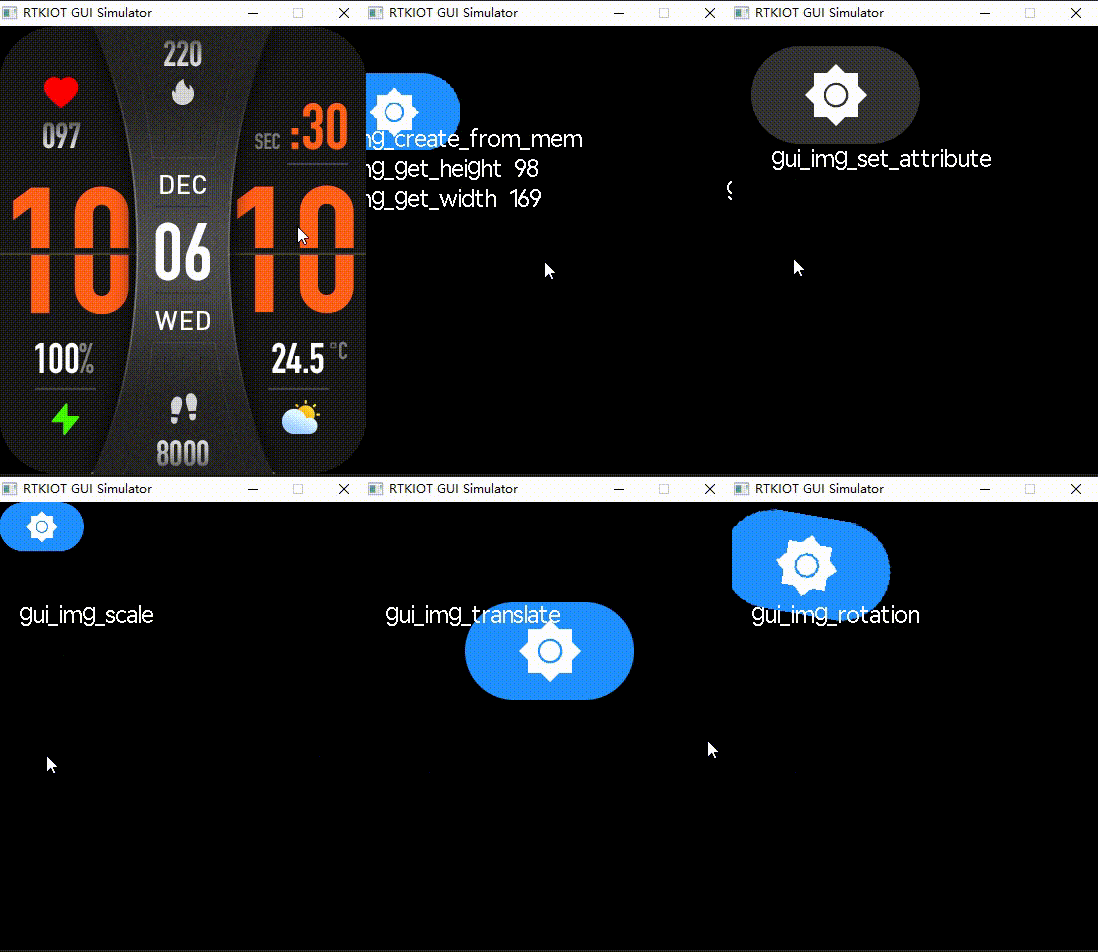
API
Functions
-
uint16_t gui_img_get_width(gui_img_t *_this)
load the image to read it’s width
- Parameters:
_this – the image widget pointer.
- Returns:
uint16_t image’s width
-
uint16_t gui_img_get_height(gui_img_t *_this)
load the image to read it’s hight
- Parameters:
_this – the image widget pointer.
- Returns:
uint16_t image’s height
-
void gui_img_refresh_size(gui_img_t *_this)
refresh the image size from src
- Parameters:
_this – the image widget pointer.
-
void gui_img_set_location(gui_img_t *_this, uint16_t x, uint16_t y)
set the image’s location
- Parameters:
_this – the image widget pointer.
x – the x coordinate
y – the y coordinate
-
void gui_img_set_mode(gui_img_t *_this, BLEND_MODE_TYPE mode)
set the image’s blend mode.
- Parameters:
_this – the image widget pointer.
mode – the enumeration value of the mode is BLEND_MODE_TYPE.
-
void gui_img_set_attribute(gui_img_t *_this, const char *name, void *addr, int16_t x, int16_t y)
set x,y and file path
- Parameters:
_this – image widget
name – change widget name
addr – change picture address
x – X-axis coordinate
y – Y-axis coordinate
-
void gui_img_rotation(gui_img_t *_this, float degrees, float c_x, float c_y)
Rotate the image around the center of the circle.
- Parameters:
_this – the image widget pointer.
degrees – clockwise rotation absolute angle
c_x – The X-axis coordinates of the center of the circle
c_y – The Y-axis coordinates of the center of the circle
-
void gui_img_scale(gui_img_t *_this, float scale_x, float scale_y)
Change the size of the image, take (0, 0) as the zoom center.
- Parameters:
_this – the image widget pointer.
scale_x – Scale in the x direction
scale_y – Scale in the y direction
-
void gui_img_translate(gui_img_t *_this, float t_x, float t_y)
move image
- Parameters:
_this – the image widget pointer.
t_x – New X-axis coordinate
t_y – New Y-axis coordinate
-
void gui_img_skew_x(gui_img_t *_this, float degrees)
skew image on X-axis
- Parameters:
_this – the image widget pointer.
degrees – skew angle
-
void gui_img_skew_y(gui_img_t *_this, float degrees)
skew image on Y-axis
- Parameters:
_this – the image widget pointer.
degrees – skew angle
-
void gui_img_set_opacity(gui_img_t *_this, unsigned char opacity_value)
Add opacity value to the image.
- Parameters:
_this – the image widget pointer.
opacity_value – The opacity value ranges from 0 to 255, default 255.
-
gui_img_t *gui_img_create_from_mem(void *parent, const char *name, void *addr, int16_t x, int16_t y, int16_t w, int16_t h)
creat an image widget from memory address
Note
creat an image widget and set attribute
- Parameters:
parent – the father widget it nested in.
name – widget name.
addr – bin file address.
x – the X-axis coordinate of the widget.
y – the Y-axis coordinate of the widget.
w – the width of the widget.
h – the hight of the widget.
- Returns:
return the widget object pointer.
-
gui_img_t *gui_img_create_from_ftl(void *parent, const char *name, void *ftl, int16_t x, int16_t y, int16_t w, int16_t h)
creat an image widget from memory address
Note
creat an image widget and set attribute
- Parameters:
parent – the father widget it nested in.
name – widget name.
ftl – not xip address, use ftl address
x – the X-axis coordinate of the widget.
y – the Y-axis coordinate of the widget.
w – the width of the widget.
h – the hight of the widget.
- Returns:
return the widget object pointer.
-
gui_img_t *gui_img_create_from_fs(void *parent, const char *name, void *file, int16_t x, int16_t y, int16_t w, int16_t h)
creat an image widget from filesystem
- Parameters:
parent – the father widget it nested in.
name – image widget name
file – image file path
x – the X-axis coordinate of the widget.
y – the Y-axis coordinate of the widget.
w – the width of the widget.
h – the hight of the widget.
- Returns:
gui_img_t*
-
void gui_img_set_animate(gui_img_t *_this, uint32_t dur, int repeat_count, void *callback, void *p)
- Parameters:
_this –
dur –
repeat_count –
callback –
p –
-
void gui_img_set_quality(gui_img_t *_this, bool high_quality)
set the image’s quality.
- Parameters:
_this – the image widget pointer.
high_quality – image drawn in high quality or not.
-
struct gui_img_t
- #include <gui_img.h>
image widget structure
Public Members
-
draw_img_t *draw_img
-
float degrees
-
float c_x
center of image x
-
float c_y
center of image y
-
float scale_x
-
float scale_y
-
float t_x
translate of screen x
-
float t_y
translate of screen y
-
void *data
-
void *filename
-
void *ftl
-
gui_animate_t *animate
-
uint16_t scope_x1
-
uint16_t scope_x2
-
uint16_t scope_y1
-
uint16_t scope_y2
-
int16_t ax
-
int16_t ay
-
uint32_t opacity_value
-
uint32_t blend_mode
-
uint32_t src_mode
-
uint32_t high_quality
-
uint32_t press_flag
press to change picture to the highlighted
-
uint32_t release_flag
-
uint32_t scope
-
uint32_t scope_flag
-
uint8_t checksum
-
draw_img_t *draw_img